Face Swap Video and Pollo Recast both transform existing footage, but they solve different production problems. Choosing the broader tool by default can introduce changes the project never needed, while choosing face replacement for a full character redesign creates an obvious mismatch.
This comparison explains what each workflow preserves, what it changes and which one fits presenter variations, viral remixes, product concepts and larger scene transformations.
What Is the Difference Between Face Swap Video and Pollo Recast?
Video face swap replaces facial identity while Pollo Recast can transform the wider character, product or setting and retain the source action and camera movement. The correct choice depends on the scope of change.
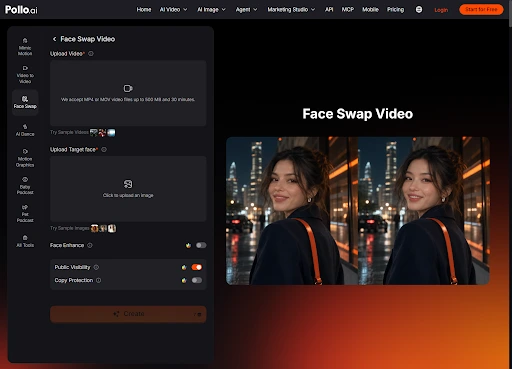
A video face swap keeps the original body, performance, wardrobe and scene while tracking a new face across expressions and movement. It suits an authorised presenter variation or personalised entertainment clip where everything except facial identity already works. This narrower scope makes review more focused because the team can compare one identity change against the source.
When Should You Use Pollo Recast Instead?
Use Recast when the concept requires more than a new face, such as replacing the entire character, product, environment or visual world. It is a transformation workflow rather than a facial correction.
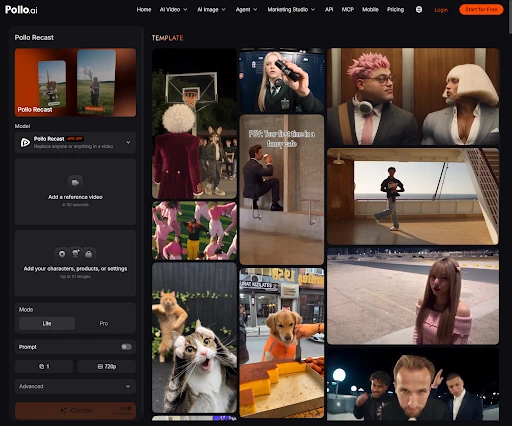
Creators can use Pollo Recast when they want to remix an existing performance with a different character, branded object or setting while retaining the action and camera structure. This fits viral concept remixes and broader campaign visualisations that would look inconsistent if only the face changed.
Decision | Face Swap Video | Pollo Recast |
Change needed | Facial identity | Character, product or world |
Preserves | Body, wardrobe and scene | Source action and camera path |
Best fit | Presenter and social variations | Concept remixes and large transformations |
Main review | Tracking and facial blending | Identity, product and scene coherence |
Which Workflow Fits Common Content Scenarios?
Choose the narrowest workflow that makes the required change and leaves approved elements untouched. Four examples make the distinction clearer.
1. Approved spokesperson variation. Use Face Swap Video when the performance, wardrobe and background stay the same and only an authorised facial identity changes.
2. Mascot replaces a human performer. Use Recast because the body, proportions and visual treatment must change beyond the face.
3. Product becomes a different model. Use Recast and verify geometry, labels and interaction; a face tool cannot transform the item consistently.
4. Personalised reaction clip. Use Face Swap Video when the humour depends on placing a permitted face into an existing performance.
What Mistakes Come from Choosing the Wrong Tool?
The wrong scope produces either unnecessary scene drift or a partial transformation that looks visually disconnected. It can also make approvals harder because more elements have changed.
Do not use full recasting when a stable face replacement is the only requirement. Conversely, do not force a face swap to represent a different character, outfit or product. Define the elements that must remain before opening either tool, and review the output against that list rather than the novelty of the transformation.
How Should You Test the Two Workflows?
Use the same short source clip and write separate pass conditions for identity and scene transformation. A fair test evaluates whether each tool completed its intended scope.
For Face Swap Video, inspect head turns, expressions, hairlines and light changes. For Recast, inspect the new character or product across the full action, including contact points and camera movement. Do not compare the tools only on visual drama; compare how much approved source work each result preserved.
Approval ownership should also match the scope. A face-only change may need identity and campaign review, while a recast product or setting may require brand, legal and product teams to verify additional details. The broader transformation can be worthwhile, but it creates more facts to approve.
Ready to Choose the Right Pollo AI Workflow?
Write one sentence describing what must change and what must remain. Choose Face Swap Video when facial identity is the only transformation; choose Pollo Recast when the character, product or scene also needs a new form. Test the hardest motion before processing the full clip.
Mastering these video workflows is a great way to scale content production, which is a key pillar discussed in our breakdown of how to make money online with AI: 5 proven business models.

- AI Face Swap Video vs Pollo Recast: Which Should You Use? - November 9, 2026
- Building Smarter APIs for Independent City Explorers - November 6, 2026
- Digital Service Businesses Rethink Customer Support Models To Improve Buyer Loyalty - November 3, 2026