Most course reviews focus on the screen. They cover the funnel, the offer, and the ad spend. They rarely mention the cable behind the wall that carries all of it.
That cable matters more than people think. A dropped upload during a product launch costs real money. When a one-person shop grows into a small team, that wiring becomes a deciding factor. Specialists like Universal Fiber Optics handle the network cabling and fiber runs that keep a busy operation moving, and the difference shows up fast in daily uptime.
A studio that buffers on a live call loses trust with an audience. The work you learn from a good program still rides on physical wiring you never see. A flawless sales page means little if the connection stalls at checkout. The right setup turns a flaky office into a quiet, reliable one.
When a Home Setup Stops Keeping Up
A single laptop on home Wi-Fi works fine at the start. One person, one video call, one upload at a time. The trouble starts when the workload grows past that.
Add a second editor, a backup drive, and a few smart cameras, and the signal gets crowded. Old copper wiring caps out fast. A Cat6 cable runs clean to about 100 meters for gigabit speeds, but that drops to roughly 55 meters once you push 10-gigabit traffic. Past those limits the signal weakens and data slows.
Here is where a home setup tends to crack first:
- Shared Wi-Fi that slows when 3 or 4 devices upload at once.
- Long copper runs stretched past their rated distance.
- No wired backbone for the gear that needs steady speed.
Standards bodies have mapped this out for decades. The Fiber Optic Association publishes the technical references that installers follow, including the TIA-568 family that governs structured cabling. Those documents exist because guesswork at the wiring stage causes problems later.
The symptoms are easy to spot once you know them. Uploads stall during peak hours. Video calls freeze when someone else hits the network. The fix is rarely a faster plan from the provider. The real bottleneck is the wiring inside the walls.
What Fiber Optic Cabling Actually Changes
Fiber moves data as pulses of light instead of electrical signals. Light travels through the glass core at roughly 200,000 kilometers per second. That speed, plus very low signal loss, is why fiber carries data far past copper limits.
The glass itself is tiny. A single-mode fiber core measures about 9 microns across, while multimode cores run 50 or 62.5 microns. Both sit inside a 125-micron cladding that keeps the light contained. Those small numbers add up to huge bandwidth.
For a growing business, the practical wins are simple:
- Distance without the 100-meter copper ceiling.
- Higher bandwidth for video, backups, and live streams.
- Less interference from motors, lights, and other cables.
A clean fiber backbone also future-proofs the space. You wire once and avoid tearing into walls again next year. The same logic that drives AI writing tools toward speed applies here, since fast software still waits on the pipe feeding it.
Bandwidth demand keeps climbing every year. A team that edits 4K video moves huge files all day. Cloud backups run in the background without warning. Fiber absorbs that load with room to spare. Copper often cannot, especially across a larger floor.
Structured Cabling Keeps the Whole Office Honest
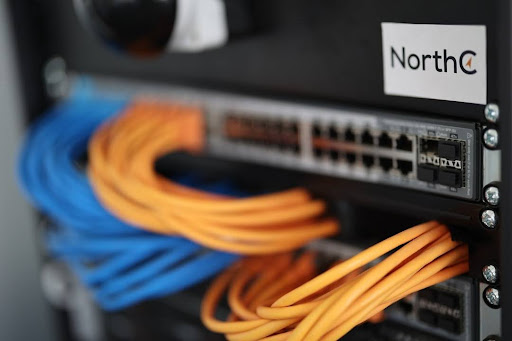
Fiber alone is not the full answer. The bigger gain comes from structured cabling, a planned system where every jack, patch panel, and run follows one map. That order is what separates a pro install from a closet full of tangled cords.
A structured system labels each cable and routes it to a central rack. When one drop fails, a technician finds it in minutes instead of hours. National infrastructure programs lean on the same logic. The federal BroadbandUSA program funds fiber expansion because reliable connectivity drives local economic growth.

A solid plan usually covers 4 layers:
- Entrance facilities where the outside line meets the building.
- A main rack that holds switches and patch panels.
- Horizontal runs to each desk, camera, and access point.
- Clear labels so future changes stay fast and cheap.
Done right, the office stops fighting its own network. The team focuses on the business, not the buffering.
Choosing a Cabling Contractor That Lasts
A good contractor is the partner who plans for next year, not just today. The first sign of one is a proper site survey. A site survey is the walk-through where the installer maps every run before quoting. That step prevents costly surprises once the work starts.
Documentation is the quiet hero here. A labeled map turns a 2-hour outage into a 10-minute fix. New hires plug in and work the same day. A creator who follows the best YouTube courses still needs a steady network to upload at full quality.
Look for a few clear markers before you sign:
- Certification from a recognized cabling body.
- Written labels and a tested handover report.
- A warranty that covers both parts and labor.
Frequently Asked Questions
Does an Online Business Really Need Fiber?
Not every business does on day one. A solo creator on a fast home plan can run for a while. The need grows with the team. Once 3 or more people share heavy uploads, a wired fiber backbone pays for itself in saved time. Live video and large backups are the clearest signs you have outgrown basic Wi-Fi.
How Long Does a Cabling Install Take?
It depends on the size of the space. A small office with 10 to 15 drops can be wired in a day or two. A larger floor with a full rack takes longer. A good contractor surveys the site first, then gives a firm timeline. Ask for labeled documentation so future fixes stay quick.
Is Fiber Worth the Cost Over Copper?
For short, simple runs, quality copper is often enough. Fiber wins when distance, bandwidth, or growth come into play. It clears the 100-meter copper limit and carries far more data. Many owners install both, using fiber for the backbone and copper for short desk runs.
Can I Wire It Myself to Save Money?
You can handle simple copper drops with care. Fiber is different. The connectors are tiny, and a 9-micron core leaves no room for error. A poor splice ruins the whole run. Hiring a certified installer protects the investment, keeps the warranty valid, and saves hours of guesswork later.

- The Niche E-Commerce Playbook: How Specialist Brands Build an Audience Online - September 25, 2026
- Kindle Publishing Income Review: Is Sophie Howard Legit? - September 23, 2026
- 7 Figure Accelerator Review: Is Philip Johansen Legit? - September 21, 2026
