Welcome to my Crayo AI review.
Give me a few minutes and I'll tell you exactly what this tool is, whether it's worth your money, and if it lives up to the hype — or if you should give it a hard pass.
I've tested a lot of AI tools over the years. Some are genuinely game-changing, some are average, and some are just plain awful. I went hands-on with Crayo AI so you don't have to gamble your money to find out which category it falls into.
So — does it actually deliver on its promises?
Let's get into it.
⭐ My Crayo AI Rating: 3 out of 5
Crayo AI earns points for genuine speed — going from prompt to exported video in minutes is impressive — and for covering trending formats like Reddit story videos and fake text conversations that most competitors ignore. The interface is clean and beginner-friendly.
It loses significant points for robotic AI voices that lack emotional nuance, a stock footage library so widely shared that your content risks looking identical to thousands of other creators, no free trial before committing financially, a refund policy that multiple users report doesn't work in practice, documented billing problems after cancellation, and a Trustpilot rating sitting at 3 out of 5 with nearly half of reviews being one star. The concept is solid — the execution and business practices behind it need serious improvement before it earns a stronger recommendation.
What is Crayo AI?
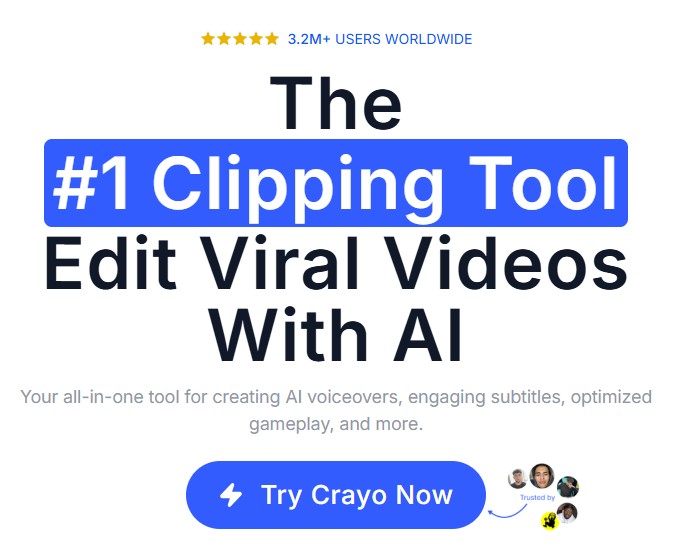
Crayo AI is an all-in-one AI-powered video creation platform designed to help you produce short-form content for TikTok, Instagram Reels, and YouTube Shorts — fast.
The pitch is simple: you input a text prompt or topic, pick a template, and Crayo spits out a fully edited video complete with automated captions, AI voiceovers, background footage, and music. They claim you can go from idea to exported video in under three minutes.
Crayo AI includes templates specifically for Reddit story videos and fake text message conversations. These formats have become massively popular on social media platforms and are especially useful if you want to make money on YouTube without showing your face. You input the dialogue or drop in a Reddit link, and the platform creates the video with background footage and narration ready to post.
Who is Crayo AI For?
Crayo AI is built for content creators, marketers, and small business owners who need to pump out short-form video content on a regular basis.
It's also a solid option if you have zero video editing experience and don't want to learn, want to batch-create content and post consistently, run a social media agency producing content for multiple clients, or if you're building a faceless YouTube channel with AI and want to scale up your output without spending hours editing. The interface is beginner-friendly enough that you don't need any technical skills to get started.
If you're running a TikTok or YouTube Shorts channel and you're drowning in the time it takes to script, record, edit, and caption everything manually — Crayo is designed to fix that problem.
It's also a solid option if you:
- Have zero video editing experience and don't want to learn
- Want to batch-create content and post consistently
- Run a social media agency producing content for multiple clients
- Love Reddit story content or trending video formats and want to scale them up
The interface is beginner-friendly enough that you don't need any technical skills to get started.
Who is Crayo AI NOT For?
Let's be honest — this tool isn't for everyone.
If you're after deep creative control and professional-grade editing, you'll hit walls fast. Crayo automates the process, which means you're trading precision for speed. Experienced video editors who are used to having full control over a timeline will likely find it frustrating.
It's also not for you if you create long-form content. Crayo is built exclusively for short-form — TikTok, Reels, Shorts. If YouTube long-form is your thing, look elsewhere.
And if you need a free trial before you commit? That's also a problem. More on that in a minute.
How Does Crayo AI Work?
The workflow is straightforward:
You start by entering your project name, then use the AI Script Generator to build out your content from a prompt or topic. After that, you pick a visual theme, select background videos from their library, choose your music, and pick an AI voice narrator. There are sliders to fine-tune your settings before you hit generate.
The final step is selecting your target platform — TikTok, Instagram Reels, or YouTube Shorts — and Crayo automatically formats and exports the video in the right dimensions and resolution.
In theory, it's a genuinely slick system. And when it works, it works fast.
Key Features
AI Script Generator — You drop in a topic or idea and the tool writes a full video script for you. The quality depends heavily on how specific your prompt is. Generic inputs get you generic scripts, so put a little thought into your brief before hitting generate.
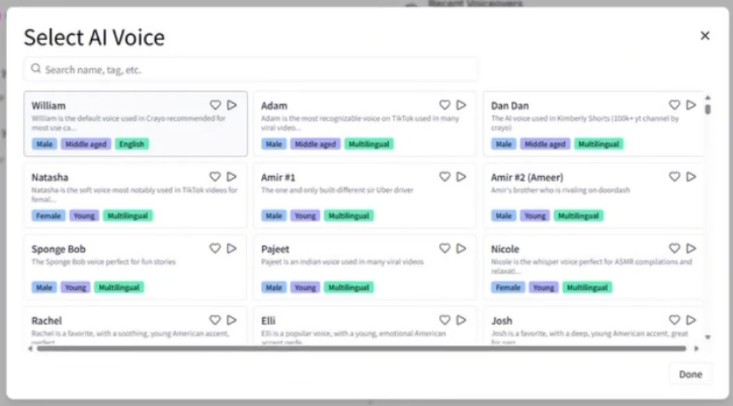
AI Voiceovers — Crayo offers 50+ AI voices across multiple languages. You pick a voice that fits your content's tone, and it generates the narration automatically. No microphone, no voice actors, no recording setup needed.
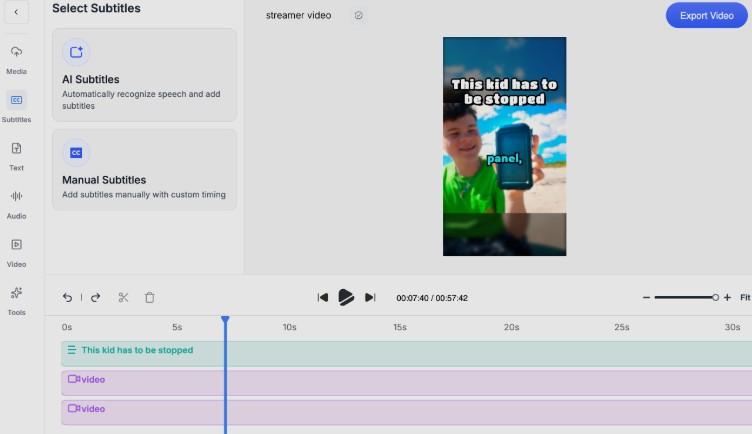
Auto-Generated Captions — The platform syncs captions automatically with your audio. This is genuinely useful for social media where a huge portion of viewers watch without sound. That said, accuracy can drop with complex phrases, so always review before publishing.
Split-Screen Videos — You can upload YouTube or TikTok URLs and Crayo builds split-screen layouts with animated captions. Great for reaction content, comparisons, or gaming clips with commentary.
Reddit Story & Fake Text Videos — These formats are massively popular right now, and Crayo handles them well. Drop in a Reddit link or create a fake text conversation, and the platform turns it into a ready-to-post video with background footage and narration.
AI Image Generation — You can generate visual assets directly within Crayo. It's handy for thumbnails and background images, though don't expect anything close to Midjourney quality here.
Background Music & Stock Footage Library — The platform includes a built-in library of trending clips and background music, so you're not starting from scratch on visuals or audio.
Multi-Platform Optimization — Create once, export in the right format for TikTok, Instagram, or YouTube Shorts without manually resizing anything.
What I Like About Crayo AI
The speed is real. Going from a text prompt to an exported video in a few minutes is genuinely impressive, and it's the platform's biggest selling point. For anyone running a high-volume content operation, that kind of automation is valuable.
The interface is clean and logical. Even on my first run through the platform, the steps made sense. You're not getting lost in menus or buried under options.
The variety of content formats is a strong point too. Most AI video tools do one thing. Crayo does Reddit stories, fake text videos, split-screen, standard short-form — it covers the formats that are actually trending right now.
What I Don't Like About Crayo AI
Here's where I have to be straight with you.
The AI voices sound robotic. This is probably the biggest quality issue. The voiceovers lack emotional nuance, and on certain content types, it shows. You're not going to fool anyone into thinking it's a real human narrator.
Subtitle accuracy isn't perfect. For complex phrases or industry-specific language, the captions can miss the mark. You'll need to proofread before you post.
Your videos risk looking generic. The background video library is shared by everyone using the platform. If you're using the same stock clips as thousands of other Crayo users, your content can start to look identical to theirs. That's a real problem if you're trying to build a distinctive brand.
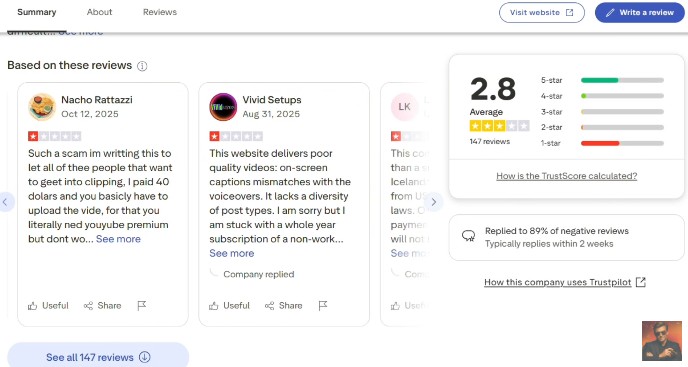
It has some bad reviews. With an average score of 2.8 out of 5, that's just not good. You can see some of the negative comments below.
There's no free trial. This one genuinely bothers me. When I'm evaluating a tool, if I can't test it before I pay, I'm not interested. A subscription wall with no free credits to play with means you're committing blind. That's a big ask, especially for a tool with this many reported issues.
The refund policy is essentially non-existent. Multiple users have reported cancelling their subscriptions only to still get charged. Some have had to contact their banks directly to block the transactions. That's not a minor complaint — that's a serious red flag. Support tickets reportedly go ignored or get dismissed.
Billing problems. Beyond the refund issues, there are patterns of inconsistent billing and unexpected charges after cancellation that keep showing up in user reviews. The Trustpilot rating sits at 3 out of 5 from over 140 reviews, with nearly half of them being one star.
Is Crayo AI Legit or a Scam?
This is the question everyone's actually asking, so let me give you an honest answer.
The core technology works. Crayo AI does produce videos. The features are real. If everything functions as it should, you can create content quickly with it.
But here's the honest picture: you're essentially gambling month-to-month on whether the platform cooperates, whether your subscription will cancel properly when you want it to, and whether the features you're paying for actually work the way they're supposed to. Bugs like videos exporting without sound, tools crashing mid-edit, and captions completely mismatching the voiceover are documented in real user reviews.
The business practices behind the platform are also concerning. Inconsistent billing, ignored support tickets, and aggressive no-refund stances aren't the hallmarks of a company that's focused on building long-term trust with its customers.
So is it a scam? Not exactly — but it's a tool with more red flags than it should have for the price being charged. Proceed with real caution.
How Much Does Crayo AI Cost?
There are three subscription tiers:
- Hobby Plan — $19/month | 50 AI videos, 40 minutes of export time, 30 voiceover minutes, 100 AI images
- Clipper Plan — $39/month | 150 AI videos, 2 hours of export time, and increased voiceover minutes
- Pro Plan — $79/month | 250 AI videos, 3 hours of export time, 180 voiceover minutes, 500 AI images
These are monthly subscriptions. There is no free plan and no free trial.
For what's on offer, the pricing isn't outrageous on paper — especially compared to hiring editors or paying for multiple separate tools. But given the reported reliability issues and billing problems, you're essentially paying to beta test software, which is a different calculation.
Can You Get a Refund?
Officially, Crayo states you can cancel your subscription at any time. In practice, user experiences tell a different story. Multiple people have reported being charged after cancellation and have had to escalate to their banks to stop the payments.
If you do decide to sign up, I'd recommend using a payment method that gives you strong chargeback protection — just in case.
Final Verdict
Crayo AI is a genuinely interesting concept and, when it works, it works fast. For high-volume content creators who live and die by short-form video output, the automation is appealing.
But the reality is that the platform comes with real quality limitations, documented reliability problems, and a billing and refund history that should give you serious pause before handing over your credit card details.
If you're committed to trying it, go in with your eyes open and know exactly what you're getting into. If you're on the fence, I'd lean toward exploring alternatives that offer a free trial so you can actually test the product before you commit.
The bottom line? Crayo AI technically works — but whether it works reliably, fairly, and consistently enough to be worth your money is a much harder question to answer with confidence.
Frequently Asked Questions
Is Crayo AI legit or a scam?
Crayo AI is not a scam in the traditional sense — the core technology works and videos are produced. However, the platform has documented reliability issues including bugs, billing problems after cancellation, and a refund policy that multiple users report does not work in practice. Proceed with caution and use a payment method with strong chargeback protection.
Does Crayo AI have a free trial?
No. Crayo AI does not offer a free plan or a free trial. You must subscribe to a paid plan before you can test the platform. This is a significant drawback compared to competitors like InVideo AI which offer free plans to test before committing.
How much does Crayo AI cost?
Crayo AI has three plans: Hobby at $19 per month with 50 AI videos, Clipper at $39 per month with 150 AI videos, and Pro at $79 per month with 250 AI videos. All are monthly subscriptions with no free trial available.
Can I get a refund from Crayo AI?
Officially Crayo states you can cancel your subscription at any time. In practice, multiple users have reported being charged after cancellation and have had to contact their banks directly to stop the payments. If you sign up, use a payment method with strong chargeback protection.
What types of videos can Crayo AI create?
Crayo AI specializes in short-form content for TikTok, Instagram Reels, and YouTube Shorts. It includes specific templates for Reddit story videos, fake text message conversations, split-screen videos, and standard short-form content. It is not designed for long-form YouTube content.
Is Crayo AI good for beginners?
The interface is clean and beginner-friendly — no video editing experience is required. However the lack of a free trial means beginners must pay before testing, and the documented reliability issues mean the experience may not be smooth for someone just starting out.
What is the best alternative to Crayo AI?
InVideo AI is the strongest alternative. It offers a free plan so you can test before committing, access to leading AI models including Google VEO 3.1 and OpenAI Sora 2, voice cloning, AI avatars, and support for both short-form and long-form content. It has a significantly stronger reliability and support record.
Does Crayo AI work for faceless YouTube channels?
Crayo AI can be used for faceless YouTube Shorts content. However it is not designed for long-form YouTube videos. For full faceless YouTube channel operations including long-form content, InVideo AI or Pictory AI are better suited options.
A Better Alternative: InVideo AI
If Crayo AI has left you feeling hesitant — and honestly, I wouldn't blame you — then InVideo AI at invideo.io is where I'd point you instead. I've looked at both tools and InVideo wins on almost every front that matters.
For starters, it has a free plan, so you can actually test it out before spending a penny. That alone puts it miles ahead of Crayo. But what really sets InVideo apart is the sheer power under the hood. While Crayo is built around basic AI automation, InVideo gives you access to some of the most advanced AI video models available right now — including Google Veo 3.1, Sora 2, and Kling AI — all within a single platform.
We're talking about a tool that can generate up to 30 minutes of video from a single prompt, with voice cloning, AI avatars, video translation, UGC ads, and a lot more on top. It also pulls from premium stock libraries like iStock and Storyblocks, so your content isn't going to look like everyone else's.
The platform serves millions of users across 190+ countries, which tells you something about its reliability and scale compared to Crayo's troubled track record. Is it a more advanced tool than Crayo? Absolutely — and that's exactly the point. If you're serious about video content creation and want a platform you can actually grow with, InVideo is where I'd start.
With a ton of AI software out there, I know it's difficult to choose. However, I've tested many over the past couple years since AI has blown up and have a lot of experience with this stuff. So, if you're looking for a solution that won't break the bank, Go with Invideo over Crayo.
Is it a more advanced tool than Crayo? Absolutely — and that's exactly the point. If you're serious about video content creation and want a platform you can actually grow with, InVideo is where I'd start. And if you're looking at the bigger picture of how to make money with AI tools beyond just video, that's worth exploring too.
Till next time!

- Launch My Agency Review: Price, Guarantee, BBB Record - October 26, 2026
- Automate Channels Review: Prices, Refunds, YouTube Risk - October 23, 2026
- Why Platform Accountability Claims Now Reshape Online Safety Law - October 22, 2026
