Welcome to my Synthesia review for 2026.
I'll be honest with you — I almost ditched my camera setup entirely and let an AI avatar take over all my videos. That’s how seriously I considered Synthesia. And if you’re reading this, you’ve probably had a similar thought: what if I could skip the studio, skip the editing grind, and just… type a script and hit generate?
Sounds like a dream, right?
Well, I spent real time inside Synthesia, tested it top to bottom, and I’m here to tell you exactly what it can do, where it stumbles, and — most importantly — whether it’s the right tool for your goals. No fluff, no hype. Just the straight goods.
Let’s get into it.
⭐ My Synthesia Rating: 4.4 out of 5
Synthesia earns its high score for genuinely impressive AI avatar realism, industry-leading multilingual support across 140+ languages, and a workflow that makes professional-looking video production accessible to complete beginners. The AI Playground with access to Google Veo 3.1 and Sora 2 is a standout addition.
It loses points for tight monthly video minute caps on entry-level plans, a limited built-in editor that will send complex projects to an external tool, content moderation that can be overly restrictive in regulated industries, and a $1,000/year add-on for studio-quality custom avatars. For corporate training, onboarding content, and global multilingual video production, it is one of the best platforms available.
What Is Synthesia?
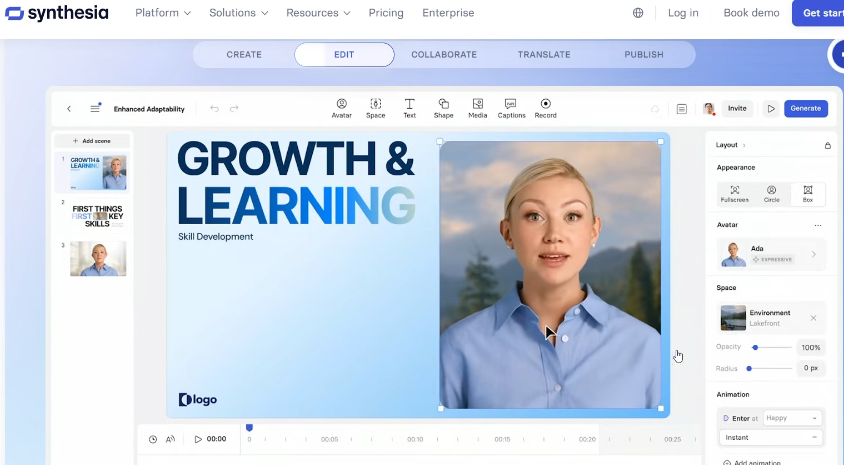
Synthesia is a cloud-based AI video creation platform that lets you generate professional-looking videos without a camera, microphone, or any kind of traditional production setup. You type in a script (or drop in a URL, PDF, or document), pick an AI avatar as your presenter, choose your language, and Synthesia generates a full video in minutes.
It was one of the very first AI avatar platforms on the internet — they’ve been around since around 2017 — and they’ve come a long way since then. Today, over 55,000 companies use the platform, including a good chunk of Fortune 100 businesses. That’s not nothing.
I think of Synthesia as the tool that answers the question: “What if I could have a professional-looking presenter in my videos without hiring one?” For a lot of use cases, it absolutely delivers on that promise. For others? Well, we’ll get there.
Who Is Synthesia For?
Synthesia is built for a pretty specific kind of user, and it’s worth being honest about that upfront.
It’s a great fit for you if:
- You’re in corporate training or HR. This is arguably Synthesia’s sweet spot. Creating onboarding videos, compliance training, policy updates, product demos — Synthesia handles all of it without you needing to book a studio or coordinate with a presenter.
- You’re a marketer who needs volume. If you need explainer videos, product walkthroughs, or landing page content cranked out fast, Synthesia can dramatically speed up your workflow.
- You run a global team or multilingual brand. With support for over 140 languages and one-click video translation, Synthesia is genuinely excellent at taking one piece of content and making it work for audiences around the world.
- You want a faceless YouTube channel. I think this is actually a really interesting angle. If you’ve been curious about faceless or automated YouTube content, Synthesia could be a powerful part of that toolkit. You can also check out my YouTube Automation Courses guide to explore that world further.
- You want to avoid being on camera. Look, not everyone loves the idea of pointing a lens at themselves. I get it. Synthesia lets your content do the talking without you having to suit up and hit record.
Who Is Synthesia NOT For?
There are some situations where I’d honestly steer you away from Synthesia, and I think it’s important to call those out.
It’s probably not for you if:
- You need emotionally driven, high-energy content. The avatars are polished and professional, but they’re not exactly going to give you chills. If your brand is personality-forward and relies on authentic human connection, a real camera will serve you better.
- You want deep video editing control. Synthesia’s built-in editor is intentionally simple — think presentation software, not Premiere Pro. If you want camera cuts, complex motion graphics, or fine-tuned audio mixing, you’ll be finishing your work in another tool.
- You’re on a tight budget and need lots of video minutes. The starter plan gives you 10 minutes of generated video per month. That sounds like more than it is once you’re in the middle of a project.
- You’re in a regulated industry like healthcare or biotech. Fair warning: Synthesia has content moderation policies that can flag legitimate content in medical or health-adjacent fields. Some users have been burned by this, so go in with eyes open.
Key Features of Synthesia
AI Avatars

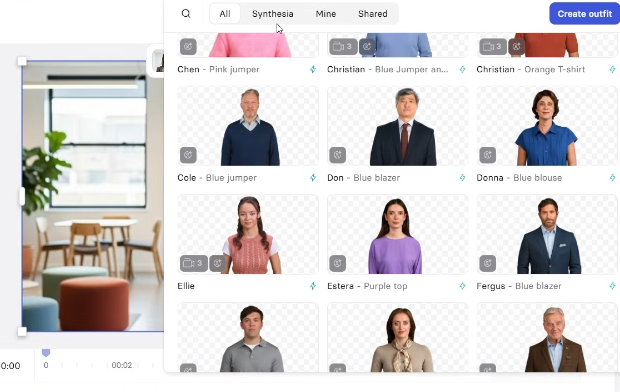
This is the headline feature, and it’s impressive. Synthesia has a library of over 240 AI avatars representing a wide range of ethnicities, ages, and professional styles. You can filter them based on what you need — casual, corporate, diverse backgrounds, different angles.
I have to say, some of the avatars genuinely had me doing a double-take. Especially with a clean background and good lighting in the scene, it can be surprisingly hard to tell you’re watching an AI. The lip sync is solid, and the facial expressions are more nuanced than you might expect.
That said, a few of the avatars still land in what I’d call the “uncanny valley” — technically correct, but something just feels slightly off in a way you can’t quite pinpoint. My advice? Lighter backgrounds and clean, simple scenes tend to make the avatars look their most convincing.
Custom and Personal Avatars
Here’s where things get genuinely wild: you can create a digital version of yourself. Record a short two-minute clip of yourself talking, and Synthesia will generate an AI avatar that looks and sounds like you. From that point on, you can produce content in your own likeness without ever picking up a camera again.
I’ll be honest — I found this a little unsettling personally. As a content creator, putting an AI version of myself out there isn’t something I’m totally comfortable with yet. But I completely understand the appeal, especially for entrepreneurs and educators who need to scale their content without scaling their screen time.
Custom studio-quality avatars are also available as a paid add-on — we’ll cover that in pricing.
Text-to-Video Creation
The core workflow is beautifully simple. You can feed Synthesia a script, a prompt, a PDF, a URL to a webpage, or even a PowerPoint file, and it will build out a full video with scenes, script, images, and an avatar presenter. I tested this with a “Top 5 Things to Do in Tokyo” concept, and the results came back in minutes.
This is what I would do if I needed to produce a high volume of educational or informational videos fast. The speed alone is genuinely impressive.
Language Support and 1-Click Translation
Synthesia supports over 140 languages and accents with 400+ AI voices. If you have an existing video and want it in French, Japanese, Arabic, or Portuguese, you can translate it in one click. The avatar’s lips will re-sync to the new language automatically.
For anyone building content for a global audience, this is a killer feature. I think of how long it would take to hire voice actors and re-record content in six different languages — Synthesia just… does it in minutes.
Video Templates
Synthesia includes over 60 pre-built templates covering training videos, marketing pitches, product demos, onboarding content, and more. They look professional out of the box and are fully customizable — you can swap in your brand colors, fonts, and logos.
AI Screen Recorder
You can record your screen directly inside Synthesia, and the AI will automatically transcribe your speech, remove filler words, and match the transcript to your recording. You can then add zoom effects to highlight specific areas at key moments. It’s handy for software walkthroughs, demos, and tutorials.
AI Video Assistant and Media Library
Synthesia includes an AI assistant that can help you write scripts, structure your content, and suggest improvements — sort of like having a video-savvy co-pilot. Combined with a media library containing millions of royalty-free images, videos, GIFs, icons, and soundtracks, it’s quite self-contained as a production environment.
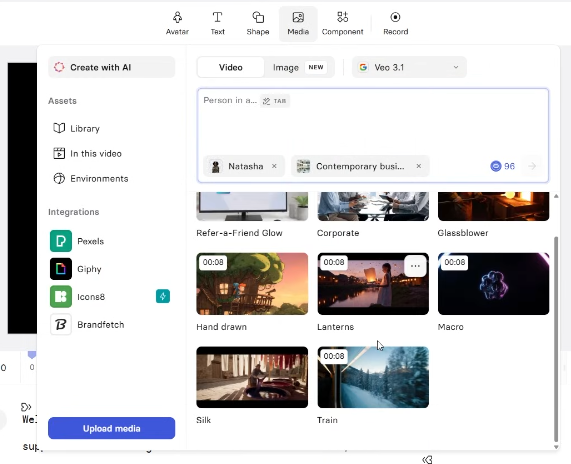
There’s also AI Playground, which gives you access to cutting-edge models like Google Veo 3.1 and Sora 2 for generating custom AI video assets and cinematic footage directly inside the platform. That’s a pretty big deal.
Collaboration Tools
Teams can work on videos together in real time — co-editing, leaving comments on specific scenes, and running approval workflows. Everything stays in one place, which keeps large-scale video projects organized and avoids the usual “which version is the final one?!” chaos.
Analytics
Once you publish your videos, Synthesia tracks views, impressions, average watch time, and completion rates. For training or onboarding content especially, this is really useful — you can actually see whether people are watching the whole thing or dropping off at minute two.
SCORM Export
For anyone using a Learning Management System (LMS), Synthesia supports SCORM export so your training videos can plug directly into platforms like TalentLMS, Docebo, and similar tools. Note: this feature is available on Enterprise plans.
How Does Synthesia Work? A Quick Walkthrough
Here’s the basic flow of creating a video, which honestly takes about as long to read as it does to do:
- Log in and click “New Video.” You can start from scratch, use a template, or let the AI Video Creator build a structure for you based on a prompt.
- Input your content. Paste a script, drop in a URL, upload a PDF, or describe what you want and let Synthesia generate an outline.
- Choose an avatar. Browse the library, filter by style, and pick the presenter that fits your video’s vibe.
- Customize. Swap out backgrounds, change the avatar’s clothing, add media, apply your brand kit, and tweak the script.
- Generate. Hit the generate button. Synthesia typically produces a finished video in a few minutes.
- Download, share, or embed. You can download the MP4, share a link, embed it on your website, or export it in SCORM format.
The whole thing really is that fast for straightforward videos. Where you’ll spend more time is in the refinement and editing — just don’t expect Premiere-level control.
Synthesia Pricing
Let’s talk money, because this is where things get a little more nuanced than the headline plans suggest.
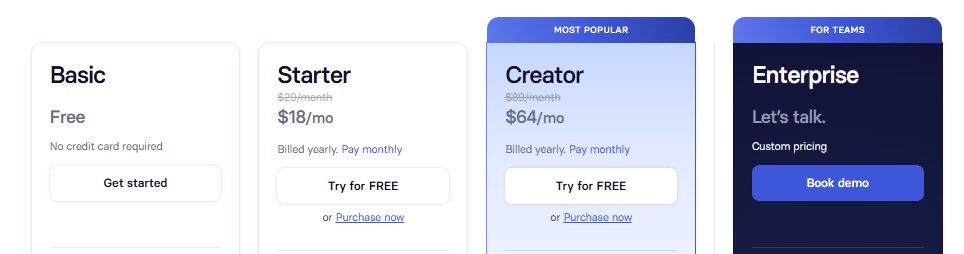
Free / Basic Plan
Synthesia has a free tier that gives you up to 3 minutes of generated video per month. The catch? You can’t download the video — you only get a shareable link — and it comes watermarked with the Synthesia logo. Think of this as a demo lane. It’s enough to test the workflow, but you won’t be able to do anything meaningful with the output until you upgrade.
Starter Plan — $29/month (or $18/month billed annually)
This is the entry-level paid plan. You get 10 minutes of video per month (120 minutes per year), access to a solid selection of avatars, downloadable MP4 files, and no watermark. This is what I would recommend for individuals or small teams just getting started.
10 minutes per month sounds like a lot until you realize that a single 5-minute training video chews through half your monthly budget. Plan accordingly.
Creator Plan — $89/month (or $64/month billed annually)
The Creator plan bumps you up to 30 minutes of video per month (360 minutes per year) and unlocks advanced features including API access, interactive videos with branching paths and quizzes, priority support, and collaboration tools. For growing teams or anyone producing content at volume, this is the realistic entry point.
Enterprise Plan — Custom Pricing
The Enterprise tier is built for large organizations and includes unlimited video minutes, single sign-on (SSO), SCORM export, 1-click video translation at scale, dedicated support, and custom onboarding. Pricing is by quote.
The $1,000 Add-On You Should Know About
Here’s the thing most reviews gloss over: if you want a custom, studio-quality personal avatar — the kind where someone professionally records you against a green screen and Synthesia recreates you in high fidelity — that’s a paid add-on at $1,000 per year, on top of your plan cost. The regular “selfie avatar” is available on Starter and Creator, but the studio version is a premium addition.
I think this is worth knowing upfront so you’re not surprised later. For most content creators and small businesses, the standard selfie avatar options are perfectly fine.
Synthesia Pros and Cons
What I Like
- Fast video creation — seriously, minutes not hours
- Massive avatar library with impressive realism on the best ones
- 140+ language support with automatic lip sync is a genuine game-changer for global content
- Clean, beginner-friendly interface that doesn’t require video editing experience
- AI Playground with access to Veo 3.1 and Sora 2 for cinematic AI footage
- Excellent for corporate training, onboarding, and e-learning at scale
- Collaboration tools make team projects manageable
- Analytics included to track video performance
- PowerPoint-to-video conversion is a clever time-saver
What Could Be Better
- Some avatars still fall into the uncanny valley — quality varies
- The built-in video editor is limited; complex edits need an external tool
- 10 minutes per month on Starter goes fast
- Studio-quality custom avatars cost $1,000/year extra
- Content moderation can be overly restrictive in certain industries
- Voices can sound a bit flat on longer narrations without emotional range
- SCORM export and some enterprise-level features are locked behind the top tier
- Renders can occasionally take longer than expected at peak times
Is Synthesia Legit or a Scam?
Synthesia is absolutely a legitimate platform. It’s been around since 2017, it’s trusted by more than 55,000 businesses including major corporations, and the core technology genuinely works. I have zero hesitation saying this is a real, reputable product.
Is it perfect? No. Is it the right tool for everyone? Also no. But if the use case fits — training content, global video production, faceless content creation — Synthesia delivers real value.
The one area where I’d encourage caution is content moderation. Their policies are sometimes restrictive in ways that aren’t fully transparent upfront, and some users in regulated industries have hit frustrating walls. Go in knowing that, and you’ll be fine.
Best Alternative to Synthesia: InVideo AI
Before I get into the broader competitive landscape, I want to give this its own section — because I think it’s that important.
If Synthesia doesn’t tick all your boxes, my number-one recommendation is InVideo AI. I’ve tested both extensively, and for the majority of content creators, YouTubers, and small business owners, InVideo is simply the more versatile and better-value option. Here’s why I feel so strongly about it.
Why I Recommend InVideo AI Over Synthesia for Most People
1. It does way more, for less money.
InVideo’s paid plans start at $25/month and include access to some of the most powerful AI video generation models on the planet — we’re talking OpenAI’s Sora 2 and Google’s VEO 3.1, bundled right inside the platform. Getting Sora 2 standalone through ChatGPT Pro would cost you around $200/month. VEO 3.1 Ultra? Closer to $250/month on its own. InVideo gives you both (plus Kling AI and others) from one subscription. That is an absolutely wild deal.
2. You’re not capped on minutes the same way.
One of Synthesia’s most frustrating limitations — especially on the Starter plan — is the monthly video minute allowance. Ten minutes per month disappears fast. InVideo’s credit system works differently and gives you far more room to produce content at volume without constantly running into a wall.
3. Better for content creators and YouTube.
InVideo was clearly built with creators in mind. It has over 5,000 templates, a text-to-video generator that produces full 10-minute YouTube videos from a single prompt, and a platform architecture that makes churning out consistent content feel genuinely manageable. If building a YouTube channel is part of your plan, InVideo is the stronger tool.
4. Faceless channel support with AI Twins.
Just like Synthesia has its personal avatar feature, InVideo has “AI Twins” — an avatar that looks and sounds like you without you needing to be on camera. This is great for faceless channel operators and camera-shy entrepreneurs, and it’s included in the platform rather than a $1,000/year add-on.
5. More flexible editing.
Synthesia’s editor is limited by design — it’s built to be simple. InVideo gives you more creative control when you want it, while still keeping the AI-assisted workflow that makes the whole thing fast. You get the best of both worlds.
Where Synthesia still wins: If you specifically need photo-realistic AI avatar presenters for corporate training, multilingual video at enterprise scale, or SCORM export for an LMS, Synthesia is purpose-built for that and InVideo isn’t. For those specific use cases, Synthesia is still the right call.
But for everyone else? InVideo AI is my top pick. I’d start there.
Check out my Invideo AI review to see why this is the best best AI video creation tool on the market today!
Synthesia vs. the Competition
For a broader view, here’s how Synthesia stacks up against other platforms in the space. I’d also recommend browsing my AI tools guide for full reviews across the board.
Synthesia vs. InVideo AI: As I covered above, InVideo is my #1 recommended alternative. It offers more creative flexibility, better value through bundled AI models (Sora 2, VEO 3.1), a much larger template library, and lower price points. Synthesia has the edge on AI avatar realism and enterprise multilingual capabilities. For most people outside of corporate L&D, InVideo wins. Read my full InVideo AI review for the deep dive.
Synthesia vs. HeyGen: HeyGen is Synthesia’s most direct competitor. HeyGen tends to lean more corporate with slightly higher prices, while Synthesia offers more customization options and a larger avatar library. I feel like Synthesia is the better pick for content creators, while HeyGen skews toward enterprise and sales use cases.
Synthesia vs. Pictory AI: Pictory is more focused on turning existing content into videos with stock footage and voiceovers — it doesn’t have the same avatar-based presenter approach. It’s a solid alternative if you want videos without on-screen presenters. Check out my Pictory AI review for more.
Synthesia vs. Lumen5: Lumen5 is excellent for turning written content into social-friendly slideshow-style videos. It’s simpler and more affordable, but doesn’t offer the avatar presenter functionality that makes Synthesia unique. See my Lumen5 review for the full breakdown.
My Verdict: Should You Use Synthesia?
Here’s the bottom line, and I’m going to give it to you straight.
If you’re a business creating training videos, onboarding content, or corporate communications — especially if you’re doing it at scale or for multiple languages — Synthesia is one of the best tools on the market. It will save you enormous amounts of time and money compared to traditional video production.
If you’re a content creator or entrepreneur looking to build a faceless YouTube channel or produce marketing videos without being on camera, Synthesia is genuinely worth exploring. Just go in knowing the monthly minute limits and plan your content accordingly.
Where I’d pump the brakes: if you need deep emotional resonance, complex editing, or high-volume output on a tight budget, you may hit the platform’s ceiling faster than you’d like.
This is what I would do — start with the free plan to test the workflow and avatar quality, decide whether the output meets your needs, and then evaluate the Starter plan from there. There’s no reason to commit to Creator right out of the gate unless you already know you’ll be producing at volume.
And if after reading all of this you’re thinking “Synthesia sounds great, but it might not be quite right for me” — that’s totally valid. My honest recommendation is to go check out InVideo AI first. It’s my #1 pick for most content creators and small business owners, it starts cheaper, and the bundled access to AI models like Sora 2 and VEO 3.1 makes it an almost absurdly good deal for the price. For everything Synthesia and more, check out my AI tools guide where I cover a full range of platforms worth knowing about.
FAQ
Is there a free version of Synthesia?
Yes! Synthesia has a free Basic plan that gives you up to 3 minutes of video per month. The videos will be watermarked and can’t be downloaded (you get a shareable link instead), but it’s a legitimate way to test the platform before committing to a paid plan.
How much does Synthesia cost?
Synthesia’s paid plans start at $29/month (or $18/month billed annually) for the Starter plan, which includes 10 minutes of video per month. The Creator plan is $89/month ($64/month annually) with 30 minutes per month. Enterprise pricing is custom. Custom studio avatars are a separate add-on at $1,000/year.
Can I create an AI avatar of myself?
Yes. Synthesia offers a “selfie avatar” feature where you record yourself for about two minutes and the platform generates an AI version of you. A higher-quality “studio avatar” is also available as a paid add-on ($1,000/year). I’ll be transparent — I personally find the idea a little unsettling, but for businesses and educators who need to scale their presence, it’s a genuinely impressive capability.
What languages does Synthesia support?
Synthesia supports over 140 languages with 400+ AI voices. It also includes 1-click video translation so you can take an existing video and produce versions in multiple languages automatically, with the avatar’s lip movements re-synced to each language.
Is Synthesia good for YouTube?
Synthesia can definitely be used for YouTube, especially if you’re building a faceless or AI-driven channel. You can generate presenter-led videos quickly and at scale. That said, YouTube audiences tend to reward authentic, personality-driven content, so I’d say Synthesia works best for informational or educational channels rather than entertainment. Check out my YouTube guide for more on building a successful channel.
Is Synthesia good for beginners?
Absolutely. The interface is intuitive and designed for people who have never edited video before. The AI Video Creator does most of the heavy lifting, and the templates make it easy to get a polished result without starting from scratch. The learning curve is genuinely low.
Can Synthesia videos be downloaded?
Yes, on all paid plans you can download your videos as MP4 files. The free plan only gives you a shareable link with a watermark.
What are the main limitations of Synthesia?
The biggest limitations are the monthly video minute caps on paid plans (especially the 10-minute Starter limit), the basic built-in video editor (which limits creative control), occasional inconsistency in avatar quality, and content moderation that can be overly restrictive in regulated industries. Also, custom studio avatars are a significant additional cost.
What is the best alternative to Synthesia?
My top recommendation is InVideo AI. For most content creators, YouTubers, and small business owners, it offers more creative flexibility, better pricing, and incredible value through its bundled access to industry-leading AI models including OpenAI’s Sora 2 and Google’s VEO 3.1 — both included starting at $25/month, versus $200–$250/month if you were to access them separately. InVideo also has over 5,000 templates, a strong text-to-video generator, and an AI Twins feature for faceless avatar-style content. The one area where Synthesia still beats it is ultra-realistic corporate avatar presenters and enterprise-grade multilingual production. But for most people? InVideo is the move. Check out my full InVideo AI review for everything you need to know.
How does Synthesia compare to other AI video tools?
Synthesia is one of the strongest platforms when it comes to AI avatar presenters and multilingual support. For broader video editing features, tools like InVideo AI offer more flexibility. For blog-to-video conversion, Pictory AI or Lumen5 may be better fits. The right tool really depends on what kind of video content you’re creating. I’ve reviewed all of them — check out my Pictory AI review, InVideo AI review, and Lumen5 review for full breakdowns.
Does Synthesia have an API?
Yes. API access is available on the Creator plan and above, allowing you to automate video creation programmatically — which is particularly useful for onboarding sequences, personalized videos, and large-scale content production pipelines.

- Dropship Breakthru Review: Price, Guarantees, Fine Print - October 11, 2026
- Best Outdoor Equipment Fulfillment Companies for DTC Brands - October 8, 2026
- Why Your Site Needs an Automated Price Calculator - October 7, 2026
