Welcome to my Pictory AI review!
Let me be honest with you: I have lost more hours to video editing than I care to admit. Staring at a timeline at 2am, nudging clips by a single frame, wondering why the audio is slightly out of sync — it is not exactly living the dream.
So when I first came across Pictory AI, I was cautiously optimistic. Another AI tool promising magic? Sure, I have heard that before. But after using Pictory for well over a year — putting it through its paces across different projects — I can tell you this thing genuinely earns its keep.
In this review, I am going to walk you through everything: what Pictory is, how it works, the pricing, my favorite features, the stuff that drives me a little crazy, and whether it is right for you. I will also throw in an FAQ section at the end for quick answers. Let's get into it.
⭐ My Pictory AI Rating: 4.5 out of 5
Pictory earns its high score for genuinely removing the friction around video production without sacrificing creative control. The multiple creation methods — script, blog URL, PowerPoint, existing recordings — cover almost every content workflow imaginable. The ElevenLabs AI voices are impressive, the stock media library is enormous on the Professional plan, and the text-based video editing feature alone is worth the subscription for anyone repurposing long-form content.
It loses points for having no mobile app, occasional AI scene mismatches, standard voices that can sound robotic on the base plan, and support response times that can run 24 to 48 hours. For content creators, bloggers, marketers, and faceless YouTube channel operators who need consistent video output fast — Pictory is one of the best tools available.
What Is Pictory AI?
Pictory AI is a cloud-based video creation platform that transforms text-based content — think scripts, blog posts, articles, slide decks, and even long-form recordings — into polished, publish-ready videos. No camera required. No film school degree needed. No soul-crushing timeline editor begging you to learn keyboard shortcuts.
The platform was founded in 2019 by a team that wanted to democratize video creation. Their core idea was simple: if you can write it, you should be able to turn it into a video without hiring a production crew. Fast forward to today, and Pictory is used by thousands of creators, marketers, educators, and businesses worldwide. They have built a reputation as one of the go-to AI video tools on the market, and I think that reputation is largely deserved.
I think of Pictory as that reliable friend who quietly takes your chaotic pile of ideas and organizes everything into something presentable. It will not win any Oscars, but it will absolutely get your content out the door — fast.
Who Is Pictory AI For?
Pictory is built for people who need video content without the headache of traditional video production. In my experience, it works best for:
- Content creators and YouTubers who want to produce videos from scripts quickly and consistently
- Bloggers and writers looking to repurpose their written content into social media videos
- Marketers and business owners who need professional-looking videos without hiring an editor
- Educators and course creators who want to turn written lesson material into engaging video lessons
- Social media managers who need to produce short-form clips for multiple platforms
- Faceless YouTube channel operators creating informational or educational content at scale — if this is your model, Pictory was practically built for you
- Anyone exploring YouTube automation who needs a reliable, fast video production tool to keep up with their content schedule
- Small businesses that want video content but do not have the budget for a full production team
Who Is Pictory AI NOT For?
Look, I want to be upfront here. Pictory is not the right tool for everyone, and I would rather save you the time than have you sign up disappointed.
- If you are a professional filmmaker or videographer who needs granular creative control, you will hit Pictory's ceiling quickly. Tools like Premiere Pro or DaVinci Resolve are your lane — if you want to sharpen those skills, I have a guide covering video editing tips worth mastering.
- If you need highly customized motion graphics, complex animations, or broadcast-level production, Pictory is not designed for that.
- If you rely entirely on mobile — there is no mobile app, which I will get into later.
- If you need to work offline, the platform is entirely cloud-based and requires internet access at all times.
That said, for the vast majority of content creators who need solid, consistent video output without the technical overhead, Pictory fits the bill remarkably well.
How Does Pictory AI Work? (Step-by-Step)
The workflow inside Pictory is genuinely one of its strongest selling points. Here is the basic process, and I promise it is simpler than you think:
1. You choose a creation method (more on those below).
2. You upload or paste in your content — a script, a blog URL, a PowerPoint, or an audio/video file.
3. Pictory's AI analyzes the content, breaks it into scenes, and automatically matches each scene with relevant stock footage, text overlays, and background music.
4. You customize — swap out visuals, change the voiceover, adjust timing, apply your brand colors, and tweak anything that feels off.
5. You export. Done. Your video is ready in whatever format you need.
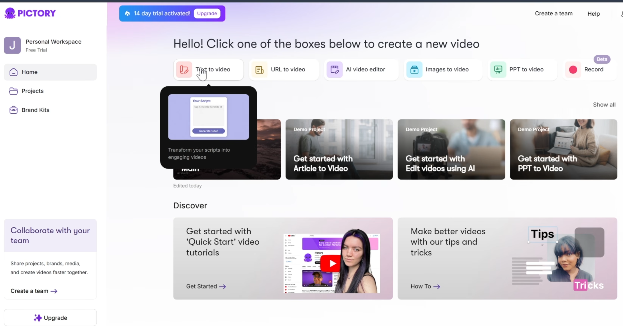
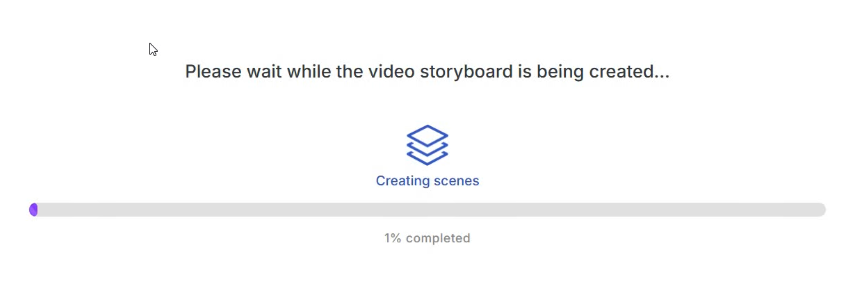
The part I genuinely love is how they have handled the blank-page problem. When you first log in, Pictory greets you with a library of demo projects you can explore and reverse-engineer. Instead of staring at an empty dashboard wondering where to begin, you can jump in and see exactly what a finished project looks like. That single design decision removes a lot of the awkward "am I doing this right?" energy that plagues so many new tools.
Key Features of Pictory AI
1. Text-to-Video / Script-to-Video
This is where Pictory earns its keep, and honestly, this feature alone justifies the subscription price for me. You paste in your script — whether you wrote it yourself or had AI help you draft it — and Pictory converts it into a full video with scenes, visuals, and captions in just a few minutes.
You can also tweak the script right inside the platform: optimize it, rephrase it, shorten it, lengthen it, or adjust the tone before generation. I tested this with a skateboarding safety script and had a complete, usable video in under four minutes. I would say about 80% of the visual matches were solid right out of the box, with only a handful of scenes needing a quick swap.
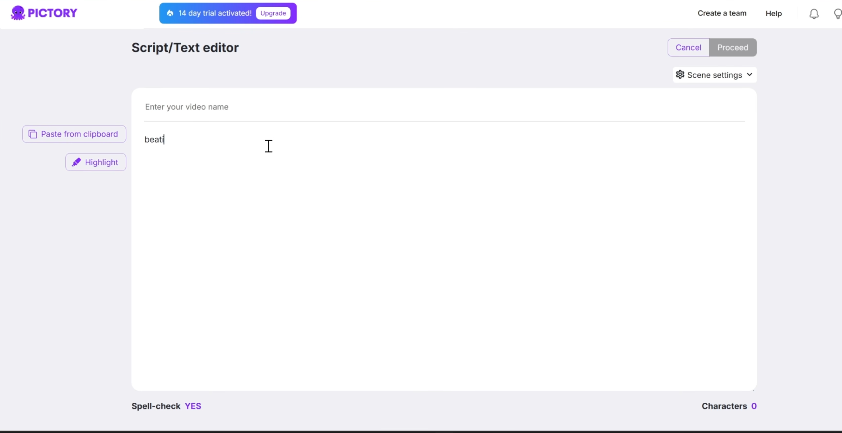
You can choose your aspect ratio — 16:9 for YouTube, vertical for TikTok and Reels, or square for social media. You can also upload your brand kit so that every video you create automatically uses your colors and logo. That is the kind of feature that sounds small but saves an enormous amount of time when you are publishing consistently.
2. URL-to-Video / Blog-to-Video
This one genuinely impressed me. You paste in a blog URL, Pictory fetches the article, analyzes the key points, and builds a video summary. I tested this with a 1,500-word blog post and had a clean, condensed video in minutes.
The AI is smart enough to identify what actually matters in the article rather than trying to cram every sentence on screen. You can adjust how long or short the final video is, ranging from a quick 60-second snippet to a more comprehensive 3-minute summary. If you are a blogger who has been ignoring video because it felt like too much work — this feature is your gateway drug.
3. Video Editing Using Text
This might be the most underrated feature in Pictory's toolkit. You upload an existing recording — a webinar, a podcast, a Zoom call — and Pictory transcribes the whole thing automatically. Then you edit the video by editing the transcript. Delete a sentence from the text? That moment disappears from the video. It is that simple.
I cannot overstate how much time this saves. Scrubbing through a 45-minute webinar to find and cut the boring bits is painful. Doing it through a text document? A completely different experience. Pictory also identifies natural break points and suggests clip lengths optimized for different platforms, which is a thoughtful touch.
4. Images to Video / PowerPoint to Video
Got a presentation gathering digital dust? Pictory can turn it into a video. I uploaded a 12-slide deck and the platform converted each slide into a video scene with transitions, voiceover, and music. The PPT-to-video option maintains your slide layout while adding motion, which is great for turning existing training materials or sales decks into shareable content.
The images-to-video feature works similarly — upload your product photos, add a script, and Pictory builds a promotional video. This is what I would do for any e-commerce client who needs a quick product showcase without a professional shoot.
5. AI Voiceovers
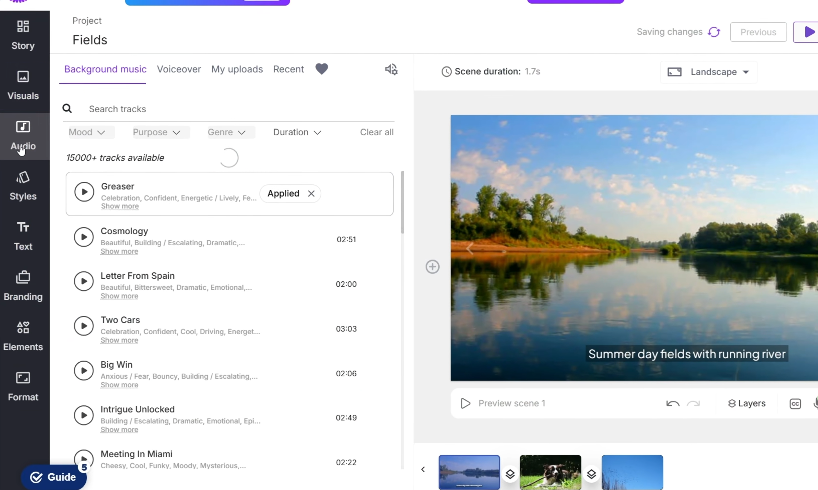
Pictory has partnered with ElevenLabs — one of the best AI voice providers in the business — and it shows. The premium voices are genuinely impressive, sounding nearly indistinguishable from human narrators. You can filter by language, accent, gender, age, and purpose to find the voice that fits your video's tone.
Now, I want to be fair here: the standard AI voices are a bit more hit-or-miss. Some sound great, others have that slightly robotic cadence that reminds you there is no human behind the mic. My honest recommendation is to invest in the Professional plan if voice quality matters to your brand — the ElevenLabs voices in that tier are worth it.
You can also upload your own recorded voiceover, and Pictory will automatically sync it to the video. That automatic voice synchronization feature has personally saved me a mountain of editing time.
6. AI Avatars
This is a newer addition and a fun one. Pictory now lets you add AI avatars to your videos — digital presenters who appear in the corner of the screen and deliver your content. You can choose an avatar, dress them for your video's tone (a skate video probably does not need anyone in a suit), and drop them into your scenes.
Just keep in mind that avatars run on AI credits — Pictory's unified currency for AI-powered features. It is a reasonable system, but worth knowing before you go avatar-happy on a 20-scene video.
7. Automatic Captioning and Subtitles
Captioning is one of those features you do not appreciate until you have lived without it. Pictory automatically generates accurate captions for every video, and research consistently shows that captioned videos retain significantly more viewers — particularly because the majority of social video is watched on mute. If you want to go deeper on maximizing your video's reach, my YouTube SEO guide covers 29 proven tips for ranking higher that pair nicely with everything Pictory helps you produce.
You can download captions in SRT or VTT format for use on other platforms, which is a clean, professional touch. I feel like this feature alone justifies the price for anyone publishing on LinkedIn or Instagram.
8. Massive Stock Media Library
Pictory gives you access to a jaw-dropping media library. On the Professional and Teams plans, you are working with over 12 million royalty-free videos and images from Getty Images and Storyblocks, plus thousands of music tracks. The Starter plan offers 2 million clips from Storyblocks, which is still substantial.
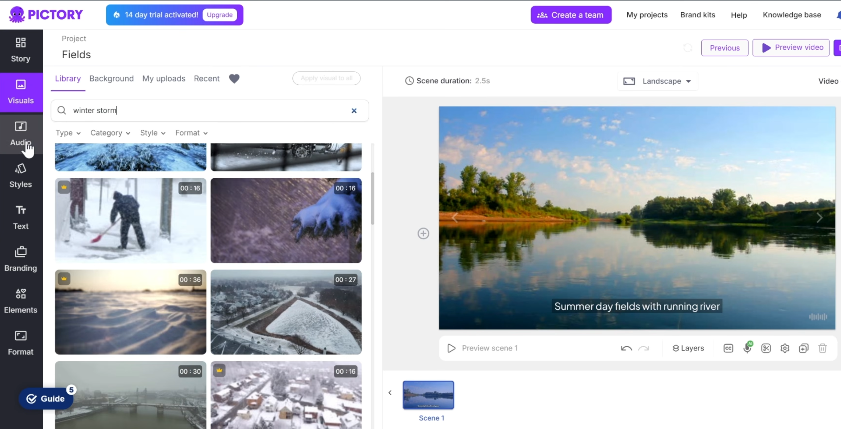
A heads-up: some of the best clips live behind the premium plans. If you find yourself constantly spotting the perfect clip only to see a premium badge on it, that is usually a good sign it is time to upgrade. The good news is that even on the base plan, you will find plenty of usable footage without hunting elsewhere.
9. Content Summarization
Got a 2-hour conference recording or a long webinar? The summarization tool pulls out the key highlights and creates a condensed version — perfect for social media recaps or quick previews. It is not a replacement for thoughtful editing, but for fast turnarounds it does the job impressively well.
10. Brand Kits
You can upload your logo, primary brand colors, and font preferences once, and every video you create will automatically reflect your brand identity. The Starter plan gives you one brand kit, Professional gives you five, and Teams gives you ten. For agencies managing multiple clients, this is a crucial feature that saves significant setup time per project.
Pictory AI Pricing: What Does It Cost?
Here is the honest truth about Pictory's pricing: I think it is quite fair, especially when you consider what you are getting. Let me break it down:
Plan | Monthly Price | Annual Price (Save up to 40%) | Best For |
Starter | $29/mo | $25/mo | Creators starting their video journey |
Professional | $59/mo | $35/mo | Creators who need professional-quality results |
Team | $199/mo | $119/mo | Teams working together on video projects |
Enterprise | Custom | Custom | Companies scaling video creation |
Starter Plan — $25/mo (Annual) | $29/mo (Monthly)
Perfect for creators just starting their video journey. You get 200 video minutes per month, access to 2 million royalty-free clips from Storyblocks, unlimited standard AI voices in 7 languages, and 1 brand kit. Paying annually saves you $4 a month over the monthly rate — not earth-shattering, but it adds up. It is a solid entry point, and I would say this is a perfectly reasonable starting place if you are not yet sure how much video you will produce.
Professional Plan — $35/mo (Annual) | $59/mo (Monthly)
This is the plan I would recommend for most serious content creators, and it is the one I use. The annual savings here are significant — you are paying $35 instead of $59, which works out to $288 saved over a year before any coupon code. The step-up in features is equally significant: 600 video minutes per month, 12 million clips from Getty Images and Storyblocks, ElevenLabs AI voices in 29 languages, 5 brand kits, advanced AI tools, and automatic voiceover sync. If you are publishing consistently, this is where you want to be.
Team Plan — $119/mo (Annual) | $199/mo (Monthly)
This one has the biggest gap between monthly and annual pricing — $80 a month difference, or nearly $960 saved over a year if you go annual. Built for teams working together on video projects, you get 1,800 video minutes, 10 brand kits, a shared team workspace, API access for automation, 240 minutes of ElevenLabs voices, and professional onboarding. The price jump from Professional is real, but if you have a team of people working in the platform regularly, the per-seat value makes a strong case for itself.
Enterprise Plan — Custom Pricing
For large organizations that need to scale video production at volume. You get everything in the Teams plan plus a dedicated success manager, priority support, video consulting, and fully customized limits across the board.
💡 Pro Tip: Go annual and save big — the Professional plan drops from $59/mo to $35/mo, saving you $288/year before any coupon. Stack that with coupon code W5TT3 for an additional 20% off, and you are looking at serious combined savings. The Team plan saves you an even more jaw-dropping $80/mo ($960/year) on annual billing. If you are committing to video content, the annual plans are a no-brainer. |
They also offer a 14-day free trial — no credit card required — which lets you create 3 videos and explore the platform risk-free. I always recommend taking full advantage of this: do one script-to-video, one blog-to-video, and one text-based edit. That trio will tell you everything you need to know about whether Pictory fits your workflow.
Pictory AI: Pros and Cons
Let me lay it out plainly. Here is what I love — and what still has room for improvement:
✅ PROS | ❌ CONS |
Extremely easy to use — no editing skills needed | No mobile app — desktop/laptop only |
Multiple creation methods (script, URL, PPT, images, audio) | Requires internet connection at all times (cloud-only) |
12M+ royalty-free stock videos and images (Pro+) | AI visuals sometimes miss the context of the text |
ElevenLabs AI voices are impressively realistic | Standard AI voices can sound robotic |
Automatic captioning and subtitle export | ElevenLabs voices locked to Professional+ plans |
Consistent updates and new features | Some of the best stock clips are premium-only |
Brand kit keeps all videos on-brand automatically | Can lag or slow down on longer video projects |
Fair pricing with generous annual discounts | Platform caps at 1080p export quality |
14-day free trial, no credit card required | Support response times can be slow (24-48 hrs) |
Demo projects remove the blank-screen problem | Hit-or-miss AI scene selection on complex articles |
Text-based video editing is a massive time-saver | Creativity ceiling — not comparable to Premiere Pro |
Avatar and AI credit system for premium features | AI credits add cost for avatar and premium features |
My Honest Experience Using Pictory
I have been reviewing Pictory for the better part of two years now, and I have watched them release update after update, consistently adding features based on user feedback. That tells me something important: the team behind this product is paying attention. That is one of the biggest green flags in software — knowing that the tool you are paying for is not going to stagnate.
My first experience was a pleasant surprise. I expected a clunky, overpromising tool that would leave me doing all the heavy lifting anyway. Instead, I found myself genuinely startled at how usable it was right out of the gate. The layout is intuitive. The workflow is repetitive in the best way — once you know the steps, they become second nature, and your output speed increases dramatically.
That said, I am not going to pretend it is perfect. There are moments when the AI grabs a stock video that makes me tilt my head and go "...that is not quite what I meant." For example, when working on a script about skateboarding safety hazards, one scene came up with what looked like a perfectly executed trick when I was looking for something more aligned with the danger angle. Is it a dealbreaker? No — it takes about five seconds to swap. But it does mean that light polishing is part of the process.
I have also run into the occasional slowdown when working on longer videos. Nothing catastrophic, but if you are on a tight deadline, that lag can be a little teeth-grinding. Hopefully something they continue to improve.
The feature I keep coming back to as my personal favorite? Text-based video editing. I cannot recommend it enough. Editing a long-form recording by deleting sentences from a transcript rather than scrubbing through a timeline has completely changed how I approach repurposing content. It is one of those tools that quietly transforms how you work without making a big fuss about it.
How Pictory Compares to Alternatives
Pictory is not the only AI video tool on the market, so here is a quick rundown of how it stacks up against some notable alternatives:
- InVideo AI: More granular creative control and over 5,000 templates, but it comes with a steeper learning curve. I find Pictory faster for bulk content creation; InVideo is better when you need a very specific custom visual style. I have a full InVideo AI review if you want a proper side-by-side breakdown.
- Fliki: Excels at short-form content for TikTok and Reels, with very natural-sounding voices — but less effective for longer YouTube content.
- Descript: Focuses on podcast and recorded video editing through text transcription. Great for editing recorded content, but not really designed for generating videos from scratch.
- Synthesia: Specializes in AI avatar-driven videos where a digital character delivers your script. Excellent for corporate training, but not great for content marketing that needs varied B-roll footage.
- Lumen5: Targets corporate and LinkedIn-focused users with professional templates. More expensive than Pictory and better suited for enterprise-level collaboration.
My take: Pictory hits the sweet spot between speed, automation, and ease of use. If you are a creator or marketer who primarily needs to produce consistent video content from text, Pictory is hard to beat at its price point.
Final Verdict: Is Pictory AI Worth It?
⭐ Short Answer: Yes — especially if you are a creator, marketer, or business owner who needs consistent video content without the traditional time and effort investment. |
Pictory shines when you want speed without sacrificing control. It turns scripts, blog posts, existing recordings, and presentations into usable videos without making you feel like a full-time editor. It is not trying to replace creativity — it is trying to remove the friction around execution.
I especially appreciate how well it works for creators who want consistency. The ability to show up, follow the same workflow, and publish without burning hours on each video is genuinely valuable. That kind of momentum is hard to overvalue when you are trying to grow a channel and build passive income on YouTube — and Pictory makes it a whole lot easier to stay consistent.
If you are allergic to complex video editors, want AI to do the heavy lifting, or simply want more content out the door in less time — Pictory fits pretty nicely. It is not for everyone, but for its target audience, it delivers. And if you are curious about other ways AI can earn its keep beyond video, I have put together a guide on how to make money with AI tools that is worth a read.
This is what I would do if you are on the fence: take the 14-day free trial, run three different types of projects through it, and see how it fits your actual workflow. No credit card. No commitment. Just hands-on experience with the tool. If it clicks — and I have a feeling it will — upgrade on an annual plan and use coupon code W5TT3 to stack your savings.
Frequently Asked Questions (FAQ)
Does Pictory AI offer a free trial?
Yes! Pictory offers a 14-day free trial with no credit card required. During the trial you can create up to 3 videos and test the core features, including script-to-video, blog-to-video, and their stock media library. Your trial videos will have a watermark, which is removed once you upgrade to a paid plan. I strongly recommend making the most of all three videos to test different use cases before committing.
What is the best Pictory AI plan for a solo content creator?
For most solo creators, I recommend the Professional plan. The jump from Starter to Professional unlocks access to over 12 million Getty and Storyblocks clips, ElevenLabs voices in 29 languages, 600 video minutes per month, and 5 brand kits. If you are publishing regularly, those upgrades are worth every penny. Start with the free trial on the Starter-level features and upgrade when you feel the ceiling.
Can I use my own voice with Pictory AI?
Absolutely. You can record your own voiceover and upload it directly to Pictory. The platform will automatically sync your audio to the video — a feature called automatic voiceover sync, available on the Professional plan and above. This is one of my personal favourite features and a genuine time-saver for creators who prefer using their own voice.
How good are the AI voices in Pictory?
It depends on which plan you are on. The standard AI voices are decent for basic narration, but can sometimes sound a bit robotic. The ElevenLabs premium voices, available from the Professional plan upward, are genuinely impressive — they sound close to natural human narration with realistic cadence, tone, and delivery. You can filter voices by language, accent, age, and purpose to find the right fit for your content.
Does Pictory AI have a mobile app?
Not currently, which is one of the most consistent criticisms from users — including myself. The platform is entirely browser-based and requires a desktop or laptop computer. You also need an internet connection at all times since it is cloud-based. If mobile editing is essential to your workflow, this is a real limitation to weigh before committing.
What video formats and aspect ratios does Pictory support?
Pictory supports three aspect ratios: 16:9 (landscape, perfect for YouTube), 9:16 (vertical, ideal for TikTok, Instagram Reels, and YouTube Shorts), and 1:1 (square, great for general social media). Videos export at up to 1080p across all plans.
Can Pictory AI edit existing videos?
Yes, and this is one of its standout features. You can upload an existing video or recording (webinars, interviews, podcasts, etc.), and Pictory will generate a full text transcript. You can then edit the video simply by editing the text — delete a sentence from the transcript and that section is removed from the video. It is one of the fastest ways to repurpose long-form content into shorter clips.
Is there a money-back guarantee?
Yes. Pictory offers a 14-day money-back guarantee on paid plans, so if you decide it is not the right fit after upgrading, you can request a refund. This, combined with the no-credit-card free trial, makes Pictory one of the lower-risk software subscriptions in this space.
How does Pictory AI handle data and privacy?
Pictory is a cloud-based SaaS platform that encrypts your data both in transit and at rest. They are GDPR compliant for European users. Importantly, the content you create remains your intellectual property — Pictory does not claim ownership of your videos or use your content to train their AI models without permission.
What are the best alternatives to Pictory AI?
The main alternatives worth looking at are InVideo AI (more creative control, steeper learning curve), Fliki (great for short-form content), Descript (best for editing recorded audio/video via transcription), Synthesia (AI avatar-focused, great for corporate training), and Lumen5 (enterprise-focused, LinkedIn-optimized). That said, for the combination of speed, automation, ease of use, and price, Pictory remains one of the strongest options available for content creators and marketers.
Can I use Pictory AI for faceless YouTube channels?
Absolutely, and this is actually one of the most popular use cases. Pictory lets you create engaging, informational YouTube videos using stock footage, AI voiceovers, captions, and text overlays — with zero on-camera presence required. Many faceless channel operators use the text-to-video and blog-to-video features to scale their content production significantly. I have a full guide on how to make money on YouTube without showing your face if you want to explore this model further, and if you are newer to the concept, my YouTube automation explainer is a great starting point.

- Dropship Breakthru Review: Price, Guarantees, Fine Print - October 11, 2026
- Best Outdoor Equipment Fulfillment Companies for DTC Brands - October 8, 2026
- Why Your Site Needs an Automated Price Calculator - October 7, 2026
