If you've been searching for a way to crank out quality videos without hiring a crew, writing a novel-length script, or selling a kidney to afford pro editing software — then you're in the right place. I've been testing Fliki AI pretty extensively, and I'm here to give you my honest, no-fluff breakdown of whether it's actually worth your money.
I feel like a lot of AI video tools promise the moon and deliver a cardboard cutout of it. So I went in skeptical. But I came out genuinely impressed with what Fliki AI can do — though it's not without its quirks. Let's dig in.
⭐ My Fliki AI Rating: 4.3 out of 5
Fliki earns its high score for an outstanding voice library, genuinely useful voice cloning, and multilingual support that most competitors can't match. The text-to-video workflow is fast, the browser-based platform runs smoothly on modest hardware, and the pricing is fair for what you get.
It loses points for AI-picked visuals that sometimes miss the mark, a credit system that takes getting used to, limited fine-grained editing control, and AI avatars locked behind the Premium plan. For faceless YouTube channels, blog-to-video repurposing, and multilingual marketing content, it's one of the best tools available.
What Is Fliki AI?
Fliki AI (fliki.ai) is a text-to-video and text-to-speech platform that lets you turn ideas, scripts, blog posts, presentations, or even Amazon product links into fully produced videos — complete with voiceover, subtitles, background music, and stock footage or AI-generated visuals. All of this happens in minutes, not hours.
I think the best way to describe Fliki is this: imagine having a video editor, voiceover artist, scriptwriter, and stock footage librarian all bundled into one web-based tool that doesn't need a powerhouse laptop to run. That's Fliki in a nutshell.
It's a browser-based platform, which means you can use it on virtually any device. No downloads, no installations, no technical headaches. If you want to see how it stacks up against similar tools, I've put together a detailed breakdown in my
Pictory AI Review and my InVideo AI Review — both worth a read before you commit to any platform.
Who Is Fliki AI For?
Fliki is a great fit for:
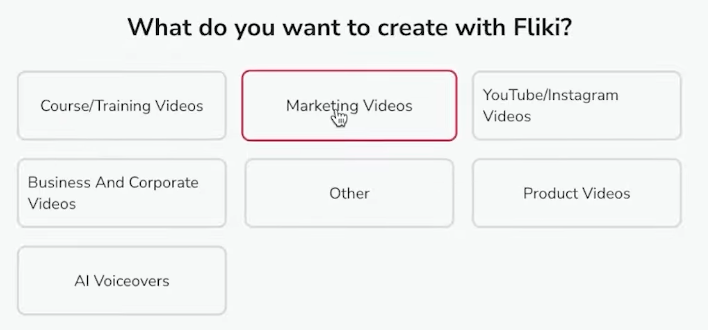
- Content creators running faceless YouTube channels who want to produce videos at scale without being on camera
- Social media managers who need quick, polished short-form content for Instagram Reels, TikTok, or YouTube Shorts
- Bloggers and marketers who want to repurpose existing content into video format
- Small business owners who want to create product or explainer videos without a big budget
- Educators and course creators building training materials or lesson videos
- Podcasters looking to generate audiogram-style clips or voice-driven content
Who is Fliki NOT for?
- Advanced editors who need frame-by-frame control and complex timeline editing
- Filmmakers or videographers working on long-form cinematic productions
- Anyone who needs to record, edit, and publish multi-hour content regularly
Speaking of faceless YouTube channels — if that's your goal, I'd strongly recommend pairing a tool like Fliki with a solid course. I've reviewed some of the
Best YouTube Automation Courses that can teach you the strategy side of things while Fliki handles the production.
Fliki AI Key Features
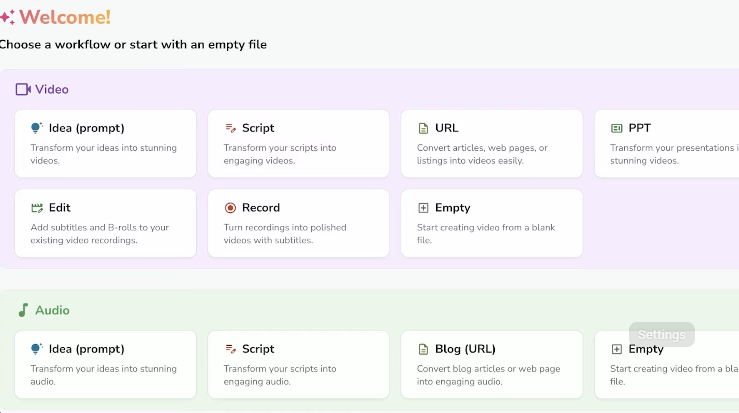
When you first log into Fliki's dashboard, it can feel like a lot is going on — but don't panic. I felt the same way on day one. Once you spend about ten minutes poking around, it becomes surprisingly intuitive. Here's a breakdown of the five main feature areas:
1. Video Generation (The Star of the Show)
This is where Fliki really shines. You can create a video from:
- An idea or prompt (just type what you want the video to be about)
- A script you've written or generated with ChatGPT
- A blog post or article URL
- A PowerPoint or presentation file
- An Amazon or Airbnb product link
- An existing video you want to edit
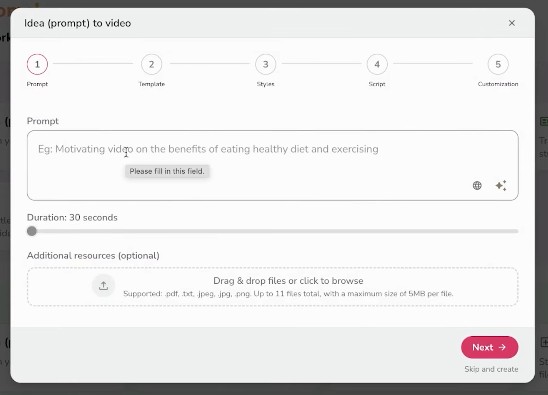
I tested the idea-to-video feature and typed a simple prompt about healthy eating. Within about 90 seconds, Fliki had generated a complete script, broken it into scenes, matched stock footage or AI images to each scene, added a voiceover, threw in subtitles, and even added transitions between clips. I honestly sat back and said, 'Okay, that's kind of wild.'
The video isn't going to be ready to post straight out of the box every single time — you'll likely swap out a clip here and there — but the foundation it builds is genuinely solid. I'd estimate it saves me about 80% of the usual production time.
2. Text-to-Speech with a Massive Voice Library
Fliki's text-to-speech engine is one of its strongest suits. On the Standard plan alone, you get access to over 1,000 voices including 200 ultra-realistic ones, spanning 80+ languages. The Premium plan bumps that up to over 2,000 voices with more than 1,000 ultra-realistic options.
What I think is really cool — and this isn't common in other tools — is that you can assign different voices to different scenes within the same video. So you could have it sound like two people are having a conversation, or simply switch tones between an intro and the main content. It's a small touch but it makes a big difference in keeping viewers engaged.
You also get controls for speed, pitch, volume, and even emotion (think: friendly, energetic, formal). For international creators or those targeting multiple markets, the multilingual support is a genuine game-changer. Fliki even has a built-in translation feature so you can repurpose one video into multiple languages without starting from scratch.
3. Voice Cloning
This is the feature that genuinely sets Fliki apart from many of its competitors. Voice cloning lets you record a sample of your own voice (about two minutes of clean audio does the trick), and Fliki will create a digital clone of your voice that you can use across all your future videos.
I think this is brilliant for brand consistency. Imagine building a YouTube channel where every video sounds like you — without you ever having to sit down and record a voiceover again. The clone quality is solid, especially with good source audio. Just make sure you're recording in a quiet environment, because noisy samples produce noticeably weaker results.
Worth noting: voice cloning requires at least the Standard plan. And yes, Fliki has ethical safeguards in place — you have to confirm you own the voice you're cloning. Good to see they're being responsible about it.
4. AI Avatars & Templates
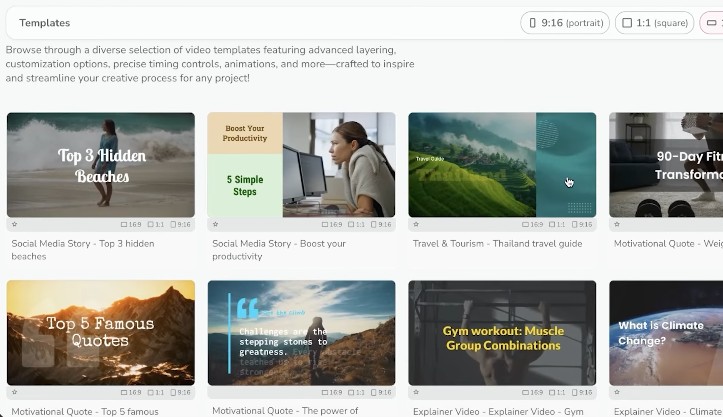
If you want a presenter-style video without being on camera, Fliki's AI avatar feature has you covered. The Templates section in the left menu gives you access to a range of niche-specific, pre-built layouts — each with its own theme, color scheme, font, and design.
Pick a template, swap in your text, choose an AI avatar, and you've got a talking-head style video in seconds. The avatars sync to the generated voiceover. Lip sync is decent for standard use cases, though I'll be honest — if you zoom in expecting broadcast-quality facial nuance, you'll notice some limitations. For social media content, explainers, and training videos, it's absolutely fine.
Full AI avatar access (including custom avatars) is available on the Premium plan. The Standard plan includes limited avatars, which should be enough to get started and see if the style works for your brand.
5. Thumbnail Maker & Design Tools
This one surprised me in a good way. Fliki includes a built-in thumbnail generator and design tool that lets you create YouTube thumbnails, social media graphics, carousels, and presentation designs — all within the same platform. You can even generate AI images to use in your designs right then and there.
I wasn't expecting Fliki to also double as a lightweight Canva alternative, but here we are. It's not going to replace a full-blown design suite, but for quick, consistent branding across your content, it does the job.
Editing Your Videos in Fliki
One thing I want to address head-on: no AI video tool is going to spit out a publish-ready masterpiece 100% of the time. Fliki doesn't claim otherwise, which I respect. But here's the good news — editing inside Fliki is actually enjoyable.
The editor works on a scene-by-scene basis. On the left panel, you'll see each scene card with its corresponding image/clip. Click on a scene and you get full control over:
- The voiceover text (what the AI reads)
- The on-screen display text (what viewers see — and it can be different from the voiceover, which is a nice touch)
- The image or video clip (swap from stock library, upload your own, or generate a new AI image)
- The voice used for that specific scene
- Text position, style, and animations
Changing an image is as simple as clicking it and either browsing the stock library, entering a new AI generation prompt, or uploading your own. You can even convert a static image into a short AI video clip with one click. Pretty slick.
The background music library is also solid — you can browse by mood/genre, type in a vibe, or just let Fliki's AI pick something that matches your script. Three different ways to add music, and all of them work well.
One thing I genuinely love: you don't need a powerful laptop for any of this. It's all browser-based. I ran Fliki on an older MacBook and it handled everything smoothly. That's a real advantage if you're just getting started and not rolling in MacBook Pro money.
Real-World Use Cases
Here's how I'd actually use Fliki in the real world — and how I think you should too:
Faceless YouTube Channel
This is the big one. Fliki is purpose-built for the faceless YouTube game. You write (or generate) a script, drop it in, and Fliki handles the voiceover, visuals, subtitles, and music. For channels in niches like finance, health, history, self-improvement, or tech, this workflow is genuinely powerful. If you're serious about building this kind of channel, pairing Fliki with one of the Best YouTube Courses out there will give you a real edge.
Blog-to-Video Repurposing
Got a blog post sitting there getting zero traffic from social? Paste the URL into Fliki and turn it into a video for YouTube, Instagram, or TikTok. This is what I would do if I had a backlog of written content and wanted to squeeze more value out of it.
Marketing & Explainer Videos
For small business owners, Fliki is a cost-effective way to create professional-looking product demos, explainer videos, or social media ads without hiring a video production agency. The branding controls (logos, brand colors, custom fonts on Premium) help keep things consistent.
Educational & Training Content
Course creators and educators can use Fliki to batch-produce lesson videos from text scripts, complete with captions for accessibility. The multilingual translation feature is particularly useful if you're building courses for international audiences.
Fliki AI Pros and Cons
✅ Pros | ❌ Cons |
Extremely fast video creation from text/ideas | Can feel slightly laggy at times |
Massive voice library (1,000–2,000+ voices) | AI-picked visuals sometimes miss the mark |
80+ languages and accent options | Credit system takes some getting used to |
Voice cloning for brand consistency | Limited template library vs. some competitors |
No powerful laptop required (browser-based) | AI avatars require Premium plan for full access |
Separate voiceover & on-screen text per scene | Support can be slow for complex issues |
AI image/video generation within editor | Fine-grained editing is limited vs. pro editors |
Background music library with AI suggestions | Free plan videos have watermark |
Free plan available (no credit card required) | AI video clips cost significant credits |
Built-in thumbnail and design tools | Niche stock footage can be hit-or-miss |
Commercial rights on paid plans | |
Multilingual translation built-in |
Fliki AI Pricing (2026)
One of the first things I always look at is pricing — because a great tool at a terrible price is still a bad deal. Here's the current breakdown (yearly billing gives you 25% off the listed monthly rates):
Feature | Free | Standard | Premium |
Monthly Price (Paid Yearly) | $0 | $21/mo | $66/mo |
Credits | 5 credits/mo | 2,160 credits/yr | 7,200 credits/yr |
Video Length | Short clips | Up to 15 min | Up to 40 min |
Video Quality | HD 720p | Full HD 1080p | Full HD 1080p |
Voices | 300 (limited) | 1,000 incl. 200 ultra-realistic | 2,000+ incl. 1,000+ ultra-realistic |
Languages | 80+ languages | 80+ + translation | 80+ + translation |
Voice Cloning | ❌ | ✅ (1 clone) | ✅ Multiple clones |
AI Avatars | ❌ | Limited avatars | All AI avatars + custom |
Watermark | Yes | No | No |
Commercial Rights | ❌ | ✅ | ✅ |
Brand Kit | ❌ | 1 Brand Kit | Multiple Brand Kits |
There's also an Enterprise plan with custom pricing, higher quotas, bulk discounts, API access, personalized avatars, professional voice cloning, a dedicated account manager, and team collaboration features. Reach out to Fliki directly for Enterprise quotes.
How Do Credits Work?
This tripped me up at first, so let me save you the confusion. Credits are deducted based on the duration of audio generated from text, and when you export a video. If you edit the script, change the voice, or add pauses, Fliki reprocesses the audio and uses more credits. My recommendation: finalize your script before generating audio, and use shorter test videos on the free plan before going all-in. The Standard plan's 2,160 credits per year works out to 180 minutes per month — plenty for most solo creators.
How Does Fliki Compare to Competitors?
I've tested a bunch of these tools, and here's my honest take on where Fliki sits in the landscape:
Pictory AI: Pictory is great at turning existing long-form content (like YouTube videos) into short clips. Fliki is stronger on text-to-video creation and voice features. Check out my Pictory AI Review for the full comparison.
InVideo AI: InVideo has a more ChatGPT-like prompt interface and a massive template library (5,000+), which makes it excellent for short-form content. Fliki wins on voice quality and the unique voice cloning feature. My InVideo AI Review has the full breakdown.
Lumen5: Lumen5 is template-first and visual-first, but it lacks AI voiceover features entirely and caps videos at 10 minutes regardless of plan — which I find limiting. See my Lumen5 Review for more context.
Synthesia: Synthesia focuses heavily on AI avatars and lip sync, making it better for corporate presentation-style videos. If you want a polished talking-head format and have the budget, Synthesia is worth considering — but Fliki is significantly more affordable and more versatile overall.
My overall take: if voice quality, multilingual support, and voice cloning are priorities for you, Fliki is the clear winner. If you need 5,000+ templates and a super-simple prompt interface, InVideo might edge it out. But for most content creators building faceless channels or marketing assets, Fliki hits the sweet spot.
How to Get Started with Fliki AI
Getting started is genuinely painless. Here's what I would do:
- Head to fliki.ai and click 'Start for Free' — no credit card needed
- Sign up with your Google account (takes about 10 seconds)
- Click 'New File' and select Video
- Choose 'Idea' and type a simple prompt for your first video
- Pick your language, aspect ratio, and whether you want stock footage or AI-generated media
- Hit Submit and watch the magic happen in about 60–90 seconds
- Tweak scenes, swap visuals, adjust the voiceover, and download
My strong advice: start with short videos (1–2 minutes) on the free plan to get a feel for how credits work and what the output looks like before committing to a paid plan. Five minutes of free credits is enough for a couple of test videos — use them wisely.
My Verdict: Is Fliki AI Worth It?
Short answer: yes, I think Fliki AI is worth it — especially if you're in the business of creating regular video content and don't want to spend half your life in a video editing suite.
I feel like Fliki occupies a really smart niche: it's more powerful than basic slideshow-style video makers, but more accessible (and affordable) than full-blown production tools. The voice library is outstanding, the voice cloning is genuinely useful, and the multilingual capabilities mean you're not locked into just one market.
Is it perfect? No. The AI-picked visuals can sometimes be a little off-target — I've had Fliki pair a quote about 'finding your chord' with a piano instead of a guitar. Funny? Yes. Ideal? Not quite. But you can fix it in about 30 seconds. The credit system also takes a little getting used to, and if you're the type who needs pixel-perfect editing control, you'll probably feel constrained.
But for the vast majority of content creators, marketers, educators, and small business owners? Fliki delivers real value at a price that won't make your accountant cry.
If you're serious about building a YouTube presence — whether on camera or off — I'd also recommend browsing through my YouTube Guide for complementary strategies and resources to help your channel grow alongside tools like Fliki.
Best For: Faceless YouTube channels, social media content, multilingual marketing, blog-to-video repurposing
Not Ideal For: Heavy post-production editing, multi-hour content, cinema-grade production
Frequently Asked Questions
Can I try Fliki AI for free?
Yes! Fliki has a free plan that requires no credit card. You get 5 credits per month, access to 300+ voices in 80+ languages, and the ability to create videos from ideas, scripts, blog posts, or presentations. Videos on the free plan are 720p and include a Fliki watermark. It's genuinely enough to see if the tool clicks with your workflow.
What are Fliki credits and how do they work?
Credits are Fliki's internal currency, deducted based on the duration of audio generated and video exported. Editing the script, changing voices, or adding pauses triggers audio reprocessing — which uses more credits. On the Standard plan (yearly), you get 2,160 credits, which equates to roughly 180 minutes of content per month. The Premium plan gives you 7,200 credits per year (600 minutes/month).
Does Fliki AI support multiple languages?
Yes, extensively. Fliki supports 80+ languages with thousands of voices and accents. You can create videos in any supported language, and the built-in translation feature lets you repurpose content across different markets without starting from scratch. This is one of Fliki's strongest differentiators compared to other AI video tools.
How good is Fliki's voice cloning?
Fliki's voice cloning is solid, especially for narration-style content. You need a clean audio sample of about two minutes. The cloned voice captures your tone and cadence well and can be used across any project. Quality drops noticeably with noisy recordings, so record in a quiet space with a decent microphone. Voice cloning is available on the Standard plan (1 clone) and Premium plan (multiple clones).
Can I use Fliki AI for commercial purposes?
Yes — commercial rights are included on the Standard plan and above. This means you can legally use Fliki-generated videos for business purposes, monetized YouTube channels, marketing campaigns, client work, and more. The free plan does not include commercial rights.
Is Fliki AI better than InVideo or Pictory?
It depends on your use case. Fliki leads on voice quality, voice cloning, and multilingual support. InVideo has a larger template library and a more intuitive prompt interface. Pictory excels at repurposing existing video content. Check out my InVideo AI Review and Pictory AI Review for full side-by-side breakdowns.
What video formats and sizes does Fliki support?
Fliki supports three aspect ratios: 16:9 (landscape, for YouTube/desktop), 9:16 (portrait, for TikTok/Reels/Shorts), and 1:1 (square, for Instagram feeds). Videos are exported as MP4 files at 720p on the free plan and Full HD 1080p on paid plans.
Does Fliki AI have an app?
Fliki is primarily a web-based platform accessible via any modern browser. It's also available on iOS and Android, so you're not tied to a desktop. The mobile experience is functional for reviewing and minor edits, though I'd recommend doing most of your content creation on a desktop for the best experience.
Is there a discount available for Fliki?
Yes! Choosing the yearly billing option gives you 25% off compared to monthly pricing. On top of that, I have a coupon code linked below that gets you an additional 20% discount on any monthly or annual plan. Make sure to apply it at checkout — there's a promotional code field right there on the payment page.
Ready to Try Fliki AI?
Every day you wait is another day your competitors are cranking out videos. I'm not saying that to be dramatic — I genuinely believe that AI video tools like Fliki are leveling the playing field for solo creators and small teams in a way that wasn't possible a few years ago.
Start your free trial today using the link below. No credit card needed. Test it out, make a few short videos, get a feel for the workflow. And if you decide to upgrade, don't forget to apply the coupon code for maximum savings.
👉 Click here to try Fliki AI for free
Have questions or want to share your experience with Fliki? Drop a comment — I read them all. And if you found this review helpful, check out my other AI tool reviews at drews-review.com/artificial-intelligence-guide.

- Dropship Breakthru Review: Price, Guarantees, Fine Print - October 11, 2026
- Best Outdoor Equipment Fulfillment Companies for DTC Brands - October 8, 2026
- Why Your Site Needs an Automated Price Calculator - October 7, 2026
