If you want to grow on YouTube in 2025, you can’t guess what’s working — you have to look at the data. YouTube Analytics is the only place that shows you why a video takes off, where viewers drop off, and what to fix in your next upload. If you’re also working on subscriber growth, make sure you read my guide on how to get more YouTube subscribers because it pairs perfectly with the metrics in this article.
The problem? YouTube gives you dozens of metrics… but only a handful actually move the needle.
In this guide, I break down the 21 YouTube Analytics metrics that matter most today, along with the new 2025 updates like Thumbnail CTR, New vs Returning Viewers, traffic pathways, and retention insights. Once you understand these numbers, you’ll know exactly how to package your videos, tighten your content, and build a channel that grows consistently.
Let’s jump in.
How to Find YouTube Analytics
If you're not sure how to find your Youtube Analytics, let's get you there in 3 easy steps.
Step 1. Log into your YouTube Account
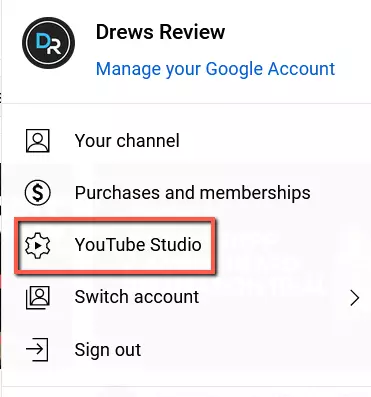
Step 2. In the upper right hand corner, click on your profile icon. Next, click YouTube Studio.
Step 3. In the left hand side menu, click on "Analytics".
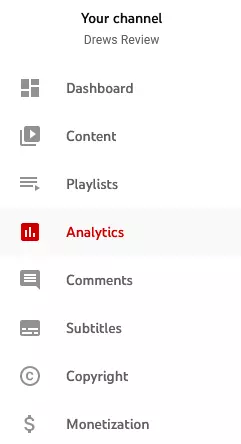
You will now be in the Google Channel Analytics dashboard. All the channel metrics that actually matter can be found here.
YouTube Analytics: The 21 Metrics That Actually Matter
1. Watch Time
The watch time metric reflects the total amount of time that users have spent watching YouTube videos on your channel, and it can be used to help better optimize and grow your content strategy.
The watch time metric is calculated by multiplying the average view duration by the number of views. It is typically used as a performance indicator for publishers, allowing you to track trends over time and see what types of content are most engaging for your audience.
By studying this metric, you can gain valuable insights into how to best optimize your channel and create more compelling and relevant content.
2. Average View Duration
The Average View Duration metric in YouTube Analytics shows you how long, on average, your viewers are watching your videos.
This information can be helpful in a number of ways. First, it can give you an idea of whether your videos are holding people's attention. If the average view duration is low, it may mean that your videos are too short or that they're not interesting enough to keep viewers engaged.
On the other hand, if the average view duration is too high, it could indicate that your videos are too long or that they're covering too much ground. In either case, this metric can give you a starting point for making adjustments to improve the overall quality of your channel.
Additionally, the Average View Duration can also be used to compare the engagement levels of different YouTube videos. This can be helpful in determining which topics are resonating with your audience and which ones might need more work.
Ultimately, the Average View Duration metric is a valuable tool for understanding how well your channel is performing and for identifying areas where you can make improvements.
3. Average Percentage Viewed
The Average Percentage Viewed metric measures the percentage of viewers who watch each video all the way through, on average.
While this information alone may not be particularly useful, combined with other metrics such as watch time and viewer retention rate, it can help you to better understand your audience and make more informed decisions about what content to produce.
For example, if you notice that the average percentage viewed is relatively low for certain videos, you might need to consider revising or removing those particular videos from your channel in order to improve overall engagement.
Additionally, by comparing this metric across your different video categories and devices, you can gain insights into which topics or formats are most popular with your audience and optimize future content accordingly.
Ultimately, a better understanding of the Average Percentage Viewed can help you to refine your content strategy and improve your overall performance on Youtube.
4. Key Moments for Audience Retention
YouTube no longer shows “Re-watches” as its own metric.
Instead, it now uses Key Moments for Audience Retention, which gives you far better insights:
- Intro dips → where viewers leave immediately
- Continuous segments → steady watch time
- Spikes → parts viewers rewatch or skip back to
- Moments that hold attention → sections that outperform your channel average
These retention insights tell you exactly which parts of a video work or fail.
For example:
If you see a spike, it usually means viewers rewound that moment — that’s your “re-watch” signal.
If you see a drop, that’s a sign to tighten your hook or remove filler.
Use this to improve future videos, not to fix old ones.
5. Audience Retention
The Audience Retention metric in Youtube Analytics shows you how much of your video people are watching on average.
This is different from the view count, which only counts how many times people have clicked on your video.
The Audience Retention metric can be found under the "Engagement" tab in Youtube Analytics. You can use this metric to see how engaging your videos are and to identify which videos are holding people's attention.
If you notice that people are only watching a small portion of your videos, you can try to improve the quality of your content or make your videos shorter. A stronger intro can also help dramatically with retention, so you may want to check out my guide on how to make a YouTube intro like a pro
The Audience Retention metric can also be used to compare the engagement of different videos on your channel. This can help you to identify which types of videos are most popular with your audience and to tailor your content accordingly.
6. Thumbnail Click-Through Rate (CTR).
YouTube renamed CTR to Thumbnail Click-Through Rate (CTR).
Thumbnail CTR shows how many people clicked your video after seeing the thumbnail + title.
It is one of the strongest discovery metrics on YouTube.
High CTR means:
- Your title is clear
- Your thumbnail communicates the value fast
- Your topic is appealing
You can improve CTR by tightening your title, simplifying your thumbnail, and matching your packaging to proven formats in your niche.
2025 benchmark:
- 4–6% = average
- 7–10% = strong
- 10%+ = usually viral potential, depending on impression
If you want even more ways to improve your click-through rate, take a look at my full YouTube SEO guide, which covers thumbnail and title optimization in much more detail.
7. Engagement
Engagement rate measures how many people are engaging with your content, including likes, comments, shares, viewers clicking on other videos in your channel, and so on.
By tracking engagement rate over time, you can gain insight into what types of content your audience likes the most, which helps you to better tailor your approach to keep them engaged.
Additionally, higher engagement rates generally correlate with increased exposure and visibility on YouTube's search engine results page, making it a key factor in improving your ranking within the platform. The higher the engagement, the better your YouTube channel performance will be.
8. Unique Viewers
The Unique Viewers metric is still available, but YouTube now prioritizes New vs Returning Viewers as the more important signal.
Unique viewers tells you:
- How many different people watch your content
- How broad your reach is
- Whether your content is attracting fresh audiences
Combine it with Returning Viewers to understand whether viewers stick with your channel after their first watch.
9. Who’s Watching Your Videos
YouTube retired the old “Who’s Watching” metric.
It has been replaced with New vs Returning Viewers, which is far more useful.
New Viewers
People discovering you for the first time.
Returning Viewers
People who have watched you before and chose to come back.
This matters because:
- Returning Viewers = loyalty + binge behavior
- New Viewers = growth + reach
Healthy channels have both.
If returning viewers drop, it means your content packaging changed too much or you’re not giving people a reason to watch the next video.
10. Views Per Unique Viewers
This metric still exists but is now presented inside “Viewer Engagement” and “Returning Viewer” panels.
It tells you:
- Whether people binge your content
- Whether your channel has a strong content loop
- Whether your thumbnails and topics connect your videos together
Higher numbers mean viewers watch multiple videos per session.
If this number is low:
- Improve end screens
- Strengthen internal video linking
- Group content into series or playlists
- Use similar packaging across related videos
11. Card Click-Through-Rate
The Card Click-Through-Rate (CTR) metric in Youtube Analytics is a valuable measure of how effective your video content is at engaging viewers and promoting user interaction with your channel.
This metric is calculated by dividing the total number of clicks on your cards by the total number of impressions for those cards, and it gives you an indication of how effectively your cards are capturing the attention of viewers and driving them to your website or other designated landing pages.
Utilizing this information can help you to improve the effectiveness and appeal of both your videos and your overall youtube channel, allowing you to create more compelling content that will keep audiences coming back for more.
Ultimately, by tracking the Card CTR in Youtube Analytics, you can gain valuable insights into what kinds of content are most effective at increasing viewer engagement, which can ultimately lead to greater success on YouTube.
12. Subscriber Growth
The Subscriber Growth metric in YouTube Analytics is a measure of how many new subscribers you've gained over a certain period of time.
You can use this metric to see if your channel is growing and to compare your growth to that of other channels. Additionally, the Subscriber Growth metric can be used to help you improve your channel.
For example, if you notice that your channel is not gaining as many subscribers as you'd like, you can try different strategies for promoting your channel or creating new content.
By understanding how the Subscriber Growth metric works, you can use it to your advantage to help grow your YouTube channel and make more money! For practical subscriber-building tactics you can use right now, see my article on how to get more YouTube subscribers.
13. Playlist Engagement
The Playlist Engagement metric in YouTube Analytics measures how often users engaged with your playlist content, including clicks to play the playlist, clicks to expand to full screen, and other interactions.
You can use this metric to see how engaging your playlist content is and make changes accordingly. For example, if you see that users are not engaging with your playlist as much as you would like, you may want to consider changing the order of the videos or adding new videos that are more likely to be engaging.
14. Traffic Sources
The Traffic Sources metric in YouTube Analytics provides information on the sources of traffic for your videos, such as organic searches, paid ads, or embedded links.
By analyzing this data, you can gain insight into which types of promotions and outreach efforts are most effective in driving new viewers to your content. To understand how YouTube decides where to send your traffic, my guide on how the YouTube algorithm works breaks down how Browse, Suggested, and Search behaves currently. Additionally, having this information at your fingertips may allow you to make tweaks to your channel strategy to draw more viewers and encourage engagement with your videos.
For example, if you notice that a particular piece of content tends to drive a lot of organic search traffic, you may decide to invest more time and energy into researching keywords or creating similar content in the future.
It's also a good idea to find out what your top YouTube search terms are. This is what led people to your videos when typing in a keyword. You can find this under Traffic Source / Youtube Search.
Knowing this data will tell you if your keyword strategy is effective or not.
15. Keywords
YouTube removed keyword visibility from Analytics years ago.
Creators no longer get a list of “keywords used to find your videos.”
What does still exist is:
YouTube Search Terms (under Traffic Sources → YouTube Search)
This shows the exact phrases people typed in before clicking your video.
This data is more limited than old “keywords,” but still useful for:
- Identifying search-based opportunities
- Finding new video ideas
- Spotting brand mentions
- Understanding viewer intent
Use these terms in:
- Titles
- Descriptions
- Voiceover scripts
- Content topics
This helps YouTube match your video to queries more accurately.
16. Overview Report
The Overview section is still valuable, but in 2025 it now focuses on:
- Traffic Source spikes
- Video performance vs. usual
- Returning vs New viewer trends
- Impressions and CTR side-by-side
- Real-time breakout signals
Use Overview for a fast health check.
It shows whether your latest video is outperforming, underperforming, or needs optimization (title change, updated thumbnail, etc.).
17. Realtime Report
This report provides information on how your YouTube channel is performing in real-time.
The Realtime Report now shows:
- A rolling 48-hour window
- Individual video performance in real-time
- Breakout signals for new uploads
- Traffic sources powering the initial push
This is especially useful in the first 24–72 hours after upload.
If a video gets:
- High CTR but low retention → packaging works, content needs improvement
- Low CTR but high retention → keep content, change the thumbnail/title
- Early surge in Browse/Suggested → strong recommendation response
Use this report to make early decisions before YouTube fully ranks your video. If you're growing a channel on a tight budget, my guide on how to make money on YouTube without spending a dime pairs nicely with what you’ll learn from these analytics.
18. New vs Returning Viewers (New 2025 Metric)
This is one of the most important analytics metrics in YouTube Studio today.
Why it matters:
- Shows loyalty
- Shows binge-watching potential
- Predicts long-term growth
- Helps YouTube understand who your content appeals to
How to use it:
- If Returning Viewers are low → build series, tighten your niche
- If New Viewers are low → improve packaging (titles + thumbnails)
- If both are strong → your channel is in excellent health
19. Suggested Video Traffic Pathways (2025 Update)
YouTube now shows how viewers move between your videos.
Examples:
- Short → Long-form
- Home → Suggested → Next Video
- External → Search → Your Video
This helps you understand:
- Where your “session starts” occur
- Which videos lead viewers into your library
- How strong your content loop is
Strengthen pathways by using:
- Consistent thumbnails
- Similar topic clusters
- End screens
- Playlists
20. Viewer Satisfaction Metrics (Surveys & Feedback)
YouTube now uses surveys to measure viewer satisfaction.
You’ll sometimes see:
- “Liked this video?” survey data
- Short-form satisfaction prompts
- Positive/negative sentiment indicators
These signals strongly impact video recommendations.
You cannot optimize surveys directly, but you can influence them through:
- Clear value delivery
- Tight pacing
- Avoiding filler
- Maintaining curiosity
Focus on retention + clarity to improve satisfaction.
21. “Typical Performance” Indicators
YouTube now shows a “Typical Performance” box comparing your latest video to your normal metrics:
- AVD
- Retention
- CTR
- Views
- Traffic sources
This gives you an instant snapshot of whether your content is above or below standard, and what needs fixing.
How to Use Youtube Video Analytics Conclusion
Now that you understand the YouTube Analytics metrics that actually matter in 2025, you can stop guessing and start making decisions based on real performance data. You don’t need to obsess over every chart in Studio — just focus on the core signals: retention, CTR, traffic pathways, and the balance between new and returning viewers.
Start small. Pick a few metrics to track. Improve one thing per video.
As you build a stronger content loop and tighten your packaging, your channel’s growth starts to compound.
Whether you run a personal brand or a faceless YouTube channel, Analytics is your roadmap. Use it consistently, and you’ll know exactly why a video performs — and what to do next time to beat it.
No matter what kind of channel you run, whether it's a branded or faceless YouTube Channel, metrics matter.
And remember, YouTube Analytics is constantly evolving, so be sure to check back often to see what new insights are available.
Tell the world about this awesome post!
Frequently Asked Questions
1. What are the most important YouTube Analytics metrics in 2025?
The most important metrics in 2025 are Thumbnail CTR, Average View Duration, retention graph “Key Moments,” New vs Returning Viewers, and your main traffic pathways. These determine how often YouTube recommends your videos and whether viewers stay on your channel.
2. What is a good YouTube CTR in 2025?
Most channels fall between 4–6% CTR.
A CTR above 7% is strong, and anything over 10% usually indicates your video has breakout potential — but only if retention holds up.
3. What is a good YouTube retention rate?
If your video keeps at least 50% retention at the 30-second mark, you’re in a good range.
For longer videos, anything above 40–50% average percent viewed is healthy.
High retention plus strong CTR is one of the best combinations for growth.
4. How often should I check YouTube Analytics?
Check Analytics 24 hours, 48 hours, and 7 days after uploading.
These windows show how YouTube is testing your video and whether you need to update your title, thumbnail, or playlist positioning.
5. Which YouTube metrics matter most for new channels?
For new channels, focus on:
- Thumbnail CTR (to get the initial click)
- Retention (to keep viewers watching)
- New vs Returning Viewers
- Traffic Sources → YouTube Search (easiest early discovery)
You don’t need to track everything — just improve these core signals one video at a time.
Related Articles

- All About Optimizing Healthcare SEO with E-E-A-T - February 12, 2026
- How Technology Is Empowering AI-Driven Enterprises Today - February 5, 2026
- Best Digital Advertising & Marketing Agencies in Calgary - February 2, 2026
